Etsy Shopify Integration: The Ultimate Guide for Sellers 2026
- Why Integrate Etsy With Shopify?
- Prerequisites for Etsy Shopify Integration
- Step-by-Step Guide to Integrate Etsy With Shopify
- Best Etsy Shopify Integration Apps
- Common Etsy Shopify Integration Challenges (and How to Fix Them)
- Best Practices for Scaling with Etsy Shopify Integration
- FAQs about Etsy Shopify Integration
- Final Thoughts
Is managing products across multiple sales channels starting to feel overwhelming? Etsy Shopify integration offers a smarter way to connect a handmade marketplace with a powerful eCommerce platform. This guide explains how syncing Etsy and Shopify helps centralize inventory, streamline orders, and scale online sales with less manual work. From setup basics to advanced automation tips, every key step is covered clearly. Explore the full guide and start building a more efficient selling system today!
Why Integrate Etsy With Shopify?

Fee Shopify Etsy integration unlocks a powerful way to scale an online store without doubling the workload. This connection lets sellers manage both sales channels from one system, cutting down errors and freeing hours for strategic growth. Below are key reasons why this Etsy Shopify integration matters for sellers:
Expand Your Sales Channels
Integrating Etsy with Shopify opens multiple sales avenues without extra manual work. Etsy has millions of buyers who love unique, handmade goods, while Shopify supports a branded online storefront with full control. Expanding to both platforms increases visibility and brings in customers who may not browse just one marketplace.
Centralized Inventory & Order Management
A key benefit of this Etsy Shopify integration is centralized control of stock and orders. When stock levels update automatically between Etsy and Shopify, overselling risks drop significantly. All orders sync into one location, making order fulfillment smoother and less error-prone.
Streamline Operations & Save Time
Managing two platforms separately can waste time and cause mistakes. Etsy Shopify integration automates listing updates, order importing, and inventory syncing. This reduces repetitive tasks and frees resources to focus on product development and customer service.
Improved Insights & Marketing Control
Combining sales data from Etsy and Shopify provides clearer performance insights. With consolidated analytics, sellers can spot trends, adjust pricing, and refine marketing strategies. Better data leads to smarter choices and stronger growth planning.
Prerequisites for Etsy Shopify Integration

To prepare for Etsy Shopify integration, confirm the following points:
Active Shopify and Etsy accounts: Both platforms must run live. The Shopify store needs an active plan, and the Etsy shop must remain open with at least one listed product.
API access and permissions: Etsy Shopify integration tools rely on the Shopify Admin API and Etsy API. These APIs allow product, order, and inventory sync across platforms.
Basic technical skills or support: Some methods require app setup, API settings, or sync rules. Technical support or basic platform knowledge helps avoid connection issues.
Platform rules and business requirements: Etsy and Shopify enforce different selling policies. Business sellers on Etsy may also need a license, while hobby sellers usually do not.
Step-by-Step Guide to Integrate Etsy With Shopify
Can I link my Shopify to Etsy? Yes! Here’s a clear, step-by-step guide to connect Shopify to Etsy free and start syncing your stores:
Step 1: Create and Configure Your Shopify Account
- Go to shopify.com and click Start for free to open an account.

- Enter your email, password, and store name as directed.

After signing up, access your Shopify dashboard. This is where you will build and manage your online store.
Choose a store name carefully. This name is part of your store’s URL and can affect brand recognition.
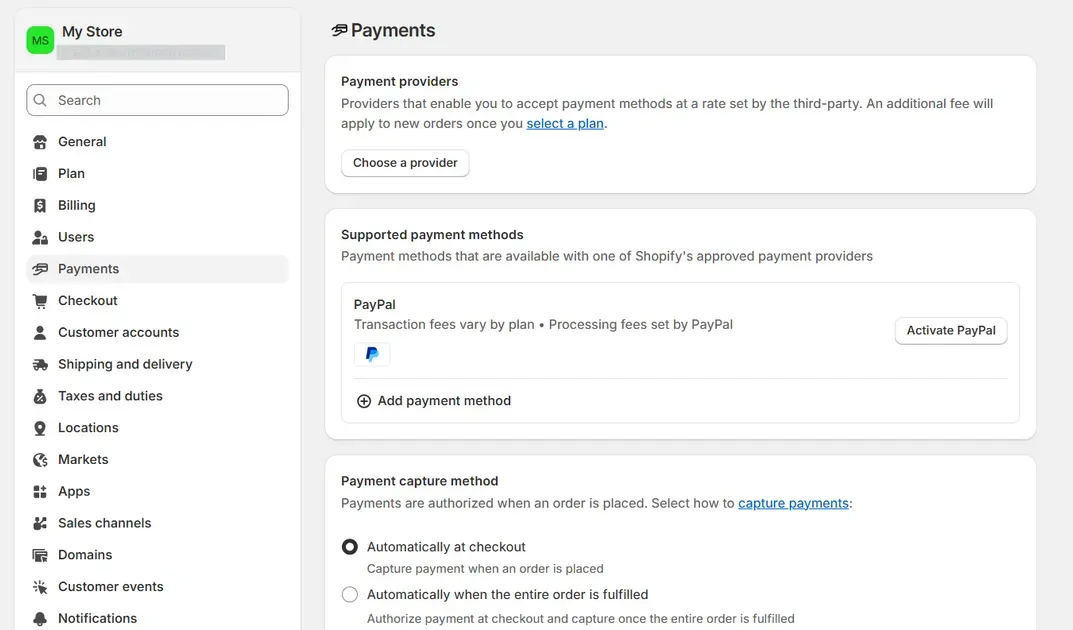
Go to Settings and customize basic settings like shipping, taxes, payment options, and sales channels.
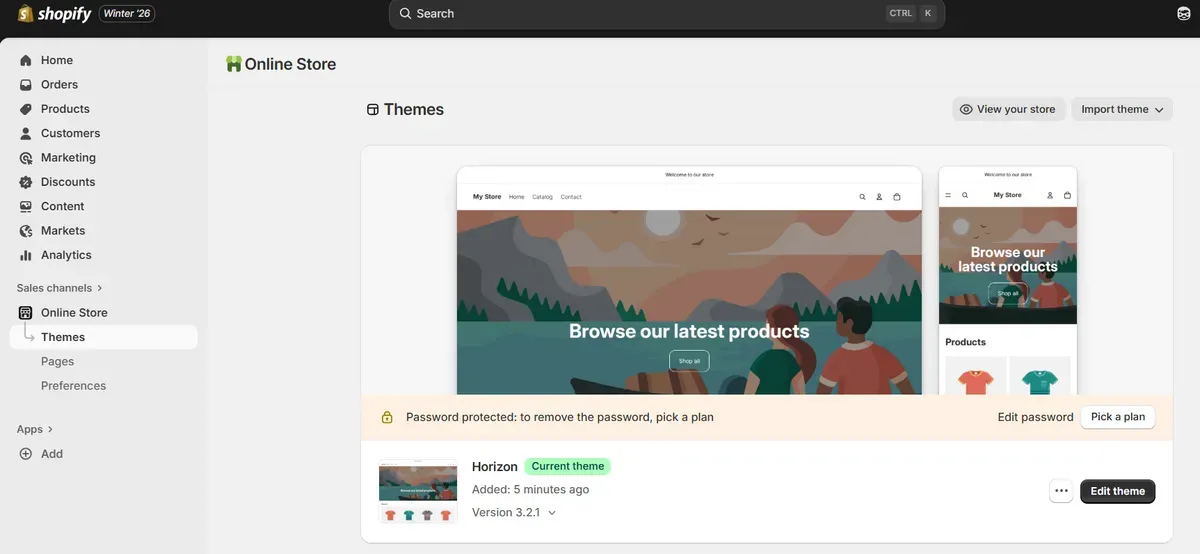
- Next, go to Online store > Themes. Pick a theme and add important pages, so visitors see a professional store from the start.
Step 2: Open and Set Up Your Etsy Shop
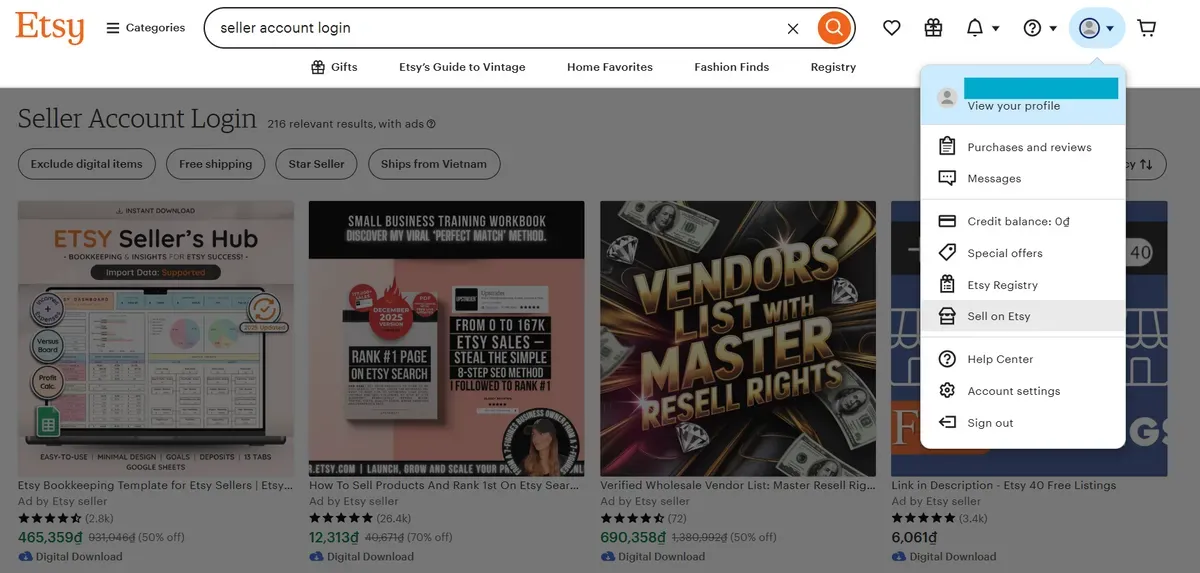
- Visit etsy.com and create an account. Click Sell on Etsy to begin.
- Click Get started.

- Click Let's do this! to agree to Etsy's policies. Then, answer suggested questions.

- Click Start your shop. Customize your shop.

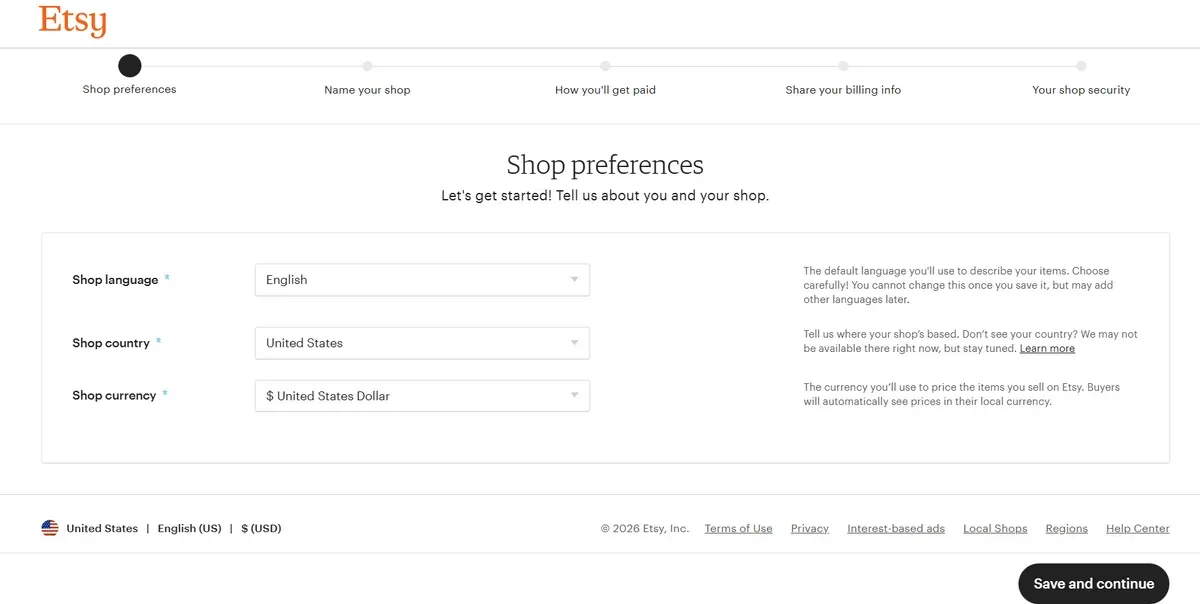
- Follow prompts to:
Choose a shop name that matches your brand.
Add product listings with clear photos and strong descriptions.
Set up shop policies and payment details.
Good photos and compelling descriptions help your listings stand out and improve sales. Etsy also charges listing and transaction fees, so learn those costs before selling.
Step 3: Install an Etsy–Shopify Integration App
Log in to Shopify and go to the Apps section.
Search for an Etsy Integration app (e.g., CedCommerce or other trusted app).
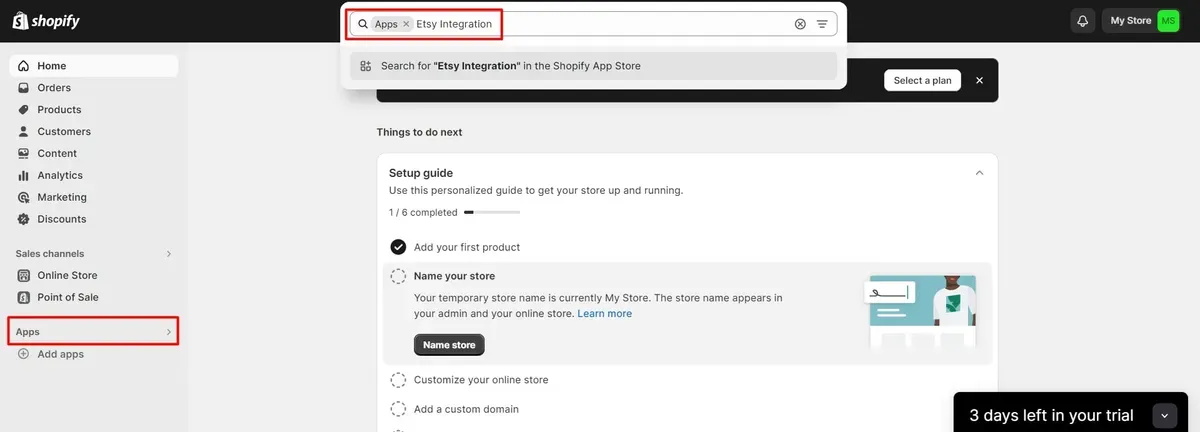
Click Add App and follow the install prompts.
Grant the required permissions so the app can access your Etsy shop.
After installation, you should see the app in the Apps list. Configure settings like inventory sync, pricing rules, and product import options to match business needs.
Step 4: Connect Your Etsy Store to Shopify
After installing the Etsy Integration app, connect Shopify to Etsy to activate data sharing.
Open the Shopify dashboard and launch the Etsy Integration app.
Click Connect to Your Etsy Shop.
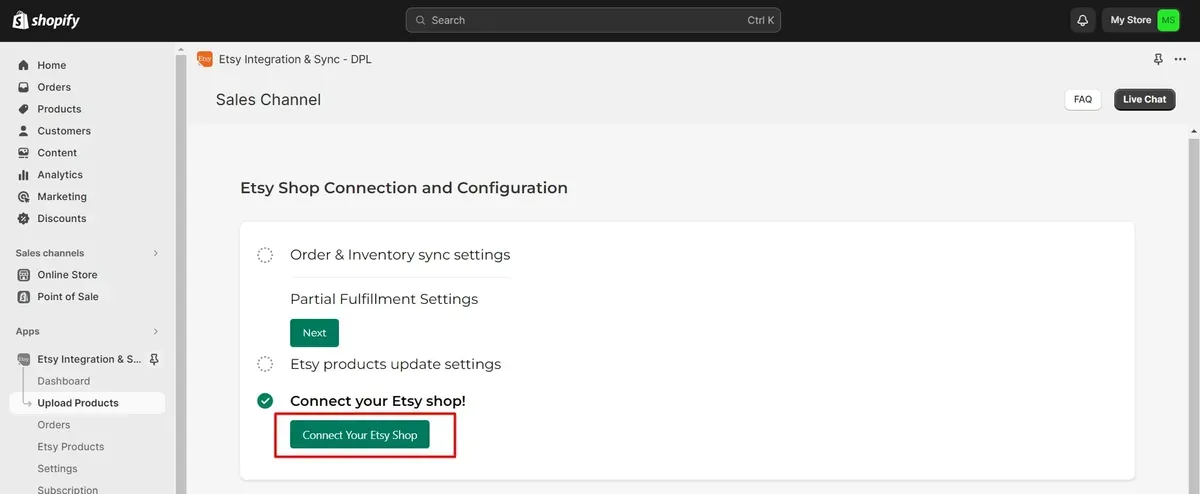
- Log in to Etsy and approve access permissions.
This authorization allows the app to read product, order, and inventory data. Once complete, a confirmation message appears to confirm the connection. This step enables real-time syncing across both platforms.
Step 5: Sync Products, Orders, and Customer Data
After you link Shopify to Etsy, start syncing products to keep listings consistent.
Open the Etsy Shopify integration app and go to the Products section.
Click Import Products from Etsy to transfer listings into Shopify.
Review imported items carefully. Check titles, images, prices, and descriptions. Make edits to align with Shopify SEO and branding standards. Accurate syncing improves customer trust and reduces errors.
Step 6: Manage Inventory and Orders Across Both Platforms
Once syncing runs, inventory updates automatically across Etsy and Shopify. This setup helps avoid overselling and stock mismatches. Orders placed on either platform appear in the Shopify admin panel for centralized fulfillment.
Regular monitoring remains important. Check stock levels often and confirm orders process correctly. Strong inventory control supports smooth fulfillment and repeat sales.
Step 7: Build a Smooth and Consistent Shopping Experience on Shopify
After Etsy and Shopify integration, focus on improving the Shopify storefront. Choose a theme that matches brand style and upload logos and brand colors. Organize product categories so visitors find items quickly.
Optimize product pages with clear descriptions, sharp images, and transparent pricing. Import Etsy reviews to Shopify and use Shopify marketing tools like discounts and campaigns to increase conversions. A polished store builds trust and supports long-term growth.
Best Etsy Shopify Integration Apps
Below are some of the top Etsy Shopify integration apps that help sync products, orders, and inventory between your Etsy shop and Shopify store. Each option offers unique tools that support multi-channel selling and smoother operations.
Etsy Integration ‑ DPL
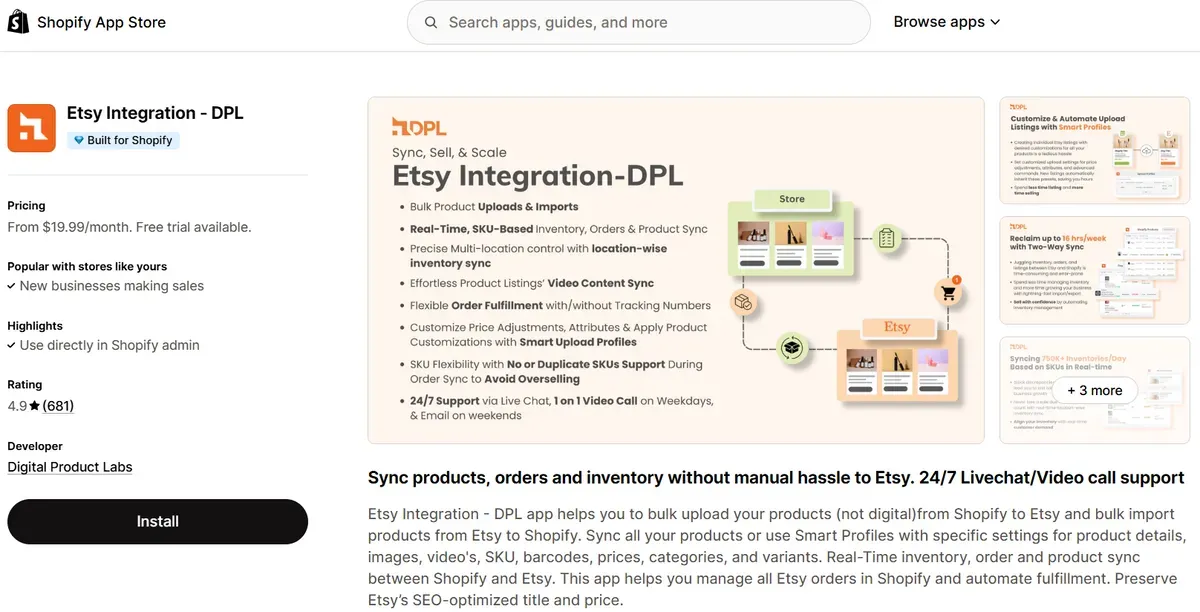
Etsy Integration ‑ DPL focuses on automation and syncing between Etsy and Shopify to reduce manual work. It supports syncing products, inventory, and orders both ways, saving time for sellers with large catalogs. The interface is designed to be user-friendly, with real-time sync to keep listings updated across both platforms. Bulk upload and import tools handle large numbers of products without extra effort. It also preserves titles and pricing optimized for Etsy’s search, helping maintain visibility on the marketplace.
Key features:
Real-time syncing of products, inventory, and orders
Bulk import/export between Shopify and Etsy
Automated order management and fulfillment
SKU & pricing sync with smart profiles
Multi-platform support and VAT handling options
Etsy Integration by QuickSync
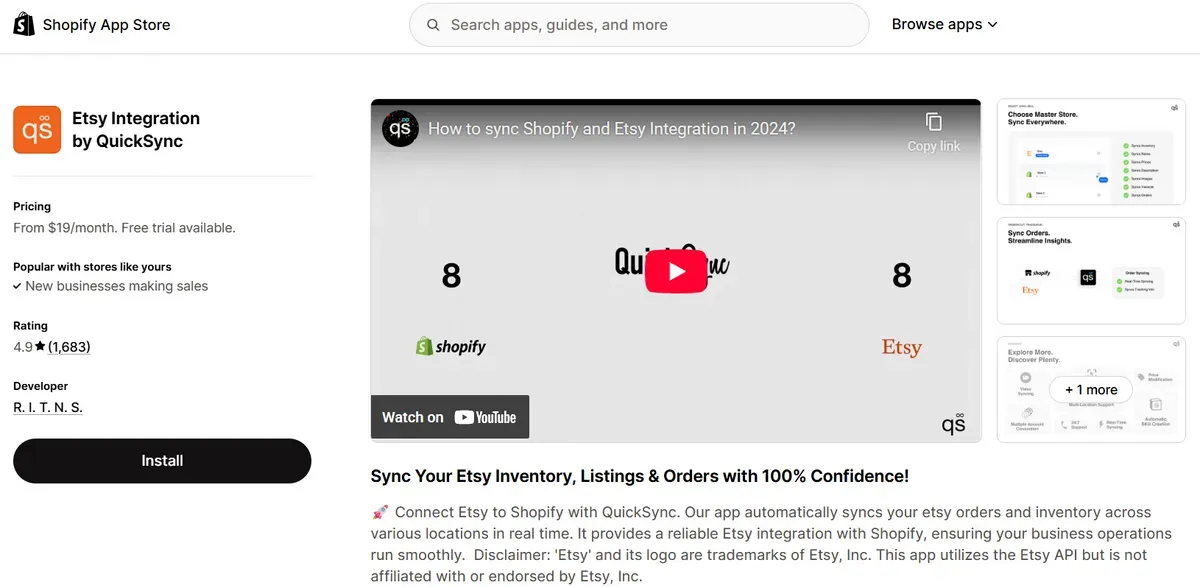
QuickSync is a highly rated Etsy Shopify integration app that focuses on simplicity and reliability. It connects Etsy and Shopify stores, so inventory and order data stay aligned without manual updates. Users report strong performance and fewer sync errors on routine operations. QuickSync’s pricing plans are varied, making it suitable for small shops and larger catalogs alike.
Key features:
Real-time inventory syncing across locations
Product sync and order importing
Multi-location and SKU support
Easy setup and user-friendly tools
Support for high-volume stores with advanced plans
Etsy Integration ‑ CedCommerce
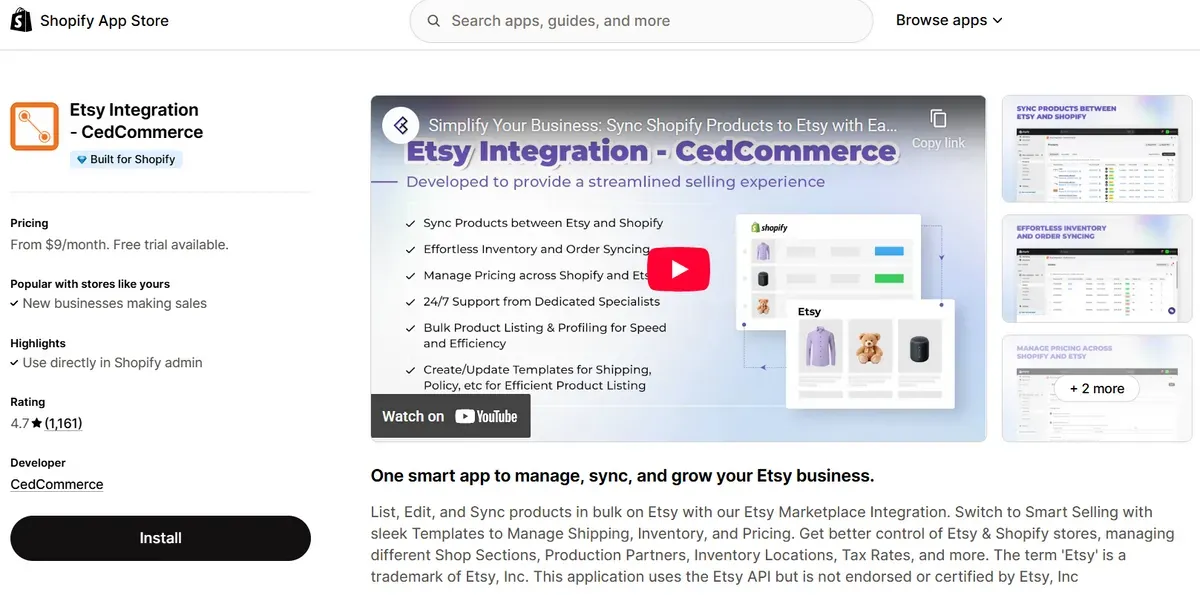
CedCommerce provides a solid Etsy Shopify syncing solution, especially for sellers needing bulk listing and pricing tools. It supports product and order syncing directly within the Shopify admin panel. Templates and profiling options help manage pricing, shipping, and inventory rules efficiently. Sellers can also segment listings by category for better control of multi-platform workflows.
Key features:
Bulk product listing and editing
Sync inventory, prices, and orders
Custom pricing and shipping templates
Multi-location support and tax settings
Centralized dashboard for control of operations
Shuttle ‑ Sync with Etsy
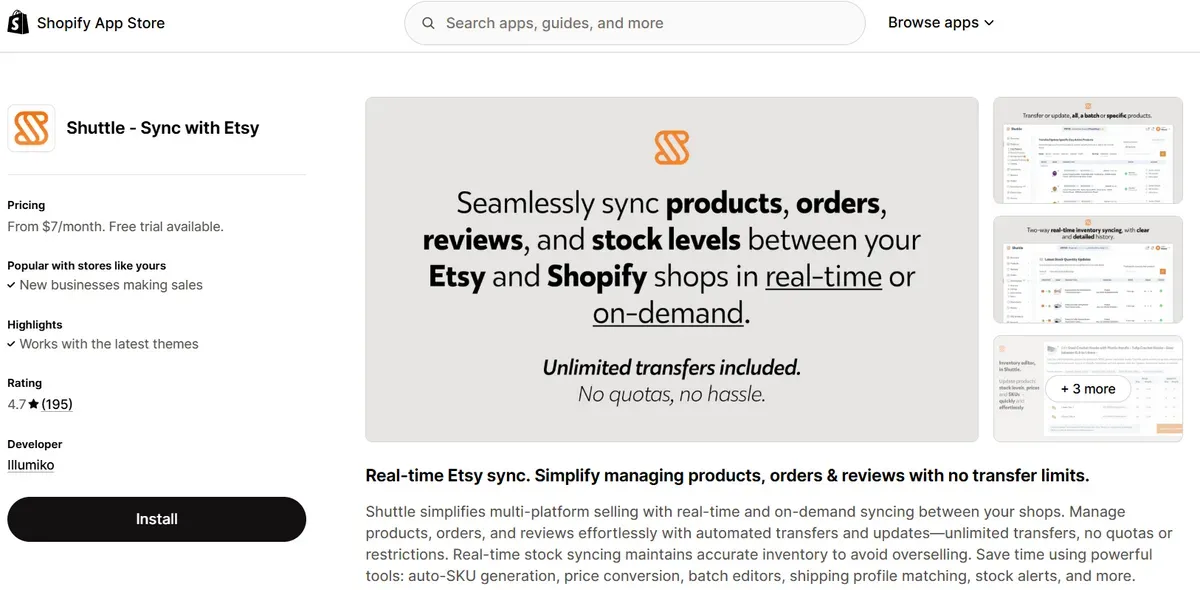
Shuttle is a flexible Etsy Shopify integration app known for its real-time syncing and automation features. It handles unlimited product transfers, order syncing, and inventory updates. Shuttle also brings Etsy reviews into Shopify, helping build trust in the main store. Its batch editors and SKU tools help manage larger catalogs with ease.
Key features:
Unlimited product and order syncing
Real-time inventory updates and stock alerts
Automatic Shopify Etsy import reviews
Batch editing and SKU generation tools
No transfer limits with customizable sync controls
Common Etsy Shopify Integration Challenges (and How to Fix Them)
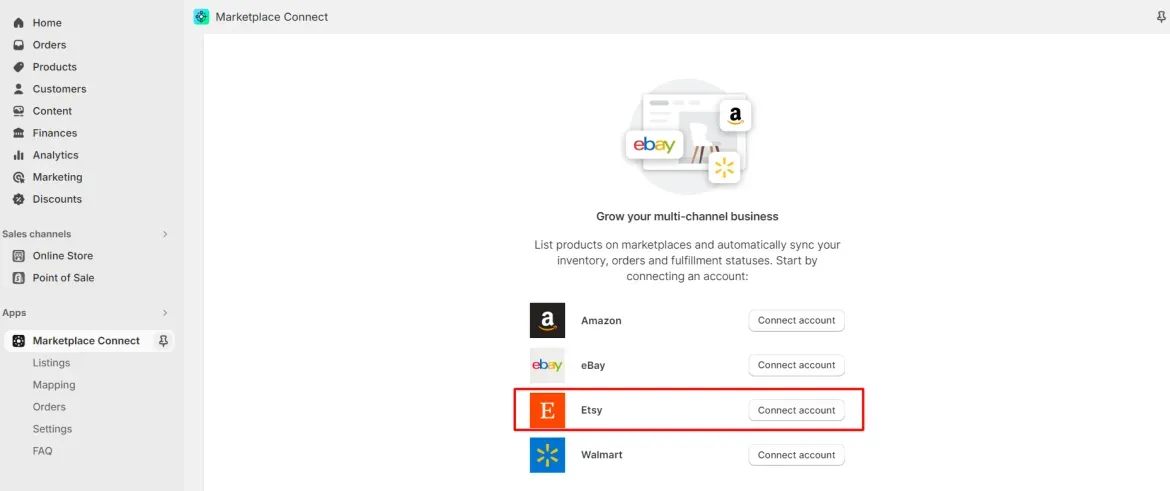
Integrating Etsy with Shopify brings big benefits, but it also introduces several common challenges that many sellers face. Here are the issues you should avoid when you import Etsy to Shopify:
Managing Multiple Sales Channels
Selling on both Etsy and Shopify adds complexity to inventory and order tracking. Without strong sync systems, stock levels can show incorrectly, leading to overselling or stockouts. This issue becomes more likely during busy sales periods or when inventory is updated manually.
How to fix it:
Use multi-channel inventory tools that update stock in real time.
Choose an Etsy Shopify integration app with central dashboard views.
Set low-stock alerts to catch discrepancies early. These tools help keep inventory aligned across platforms, reduce manual work, and prevent errors.
Inefficient Shipping Processes
Shopify and Etsy calculate and manage shipping differently, which can slow fulfillment or create mismatches in shipping costs and details. This can confuse customers and complicate order handling between platforms.
How to fix it:
Implement shipping Etsy Shopify integration apps that sync shipping info between Etsy and Shopify.
Standardize carrier settings across both platforms for consistency.
Use automation to populate tracking numbers and dispatch status. Streamlined shipping keeps orders moving quickly and reduces incorrect charges at checkout.
Limited Payment Options
Etsy and Shopify offer different payment gateways and buyer options. If only a few payment methods are enabled, some customers may abandon carts before purchase.
How to fix it:
Add popular payment options like credit/debit cards, PayPal, Apple Pay, and other wallets.
Confirm gateways work on both Etsy and Shopify stores.
Test the checkout process to ensure buyers can complete purchases smoothly. More payment choices can directly boost conversion rates and overall sales.
Inefficient Delivery Management
Tracking deliveries across two sales platforms can be disjointed. Inconsistent delivery updates or missing carrier information can harm customer satisfaction and lower repeat business.
How to fix it:
Use delivery management or fulfillment tools that capture updates from both Shopify and Etsy.
Sync carrier tracking and delivery status into a single view.
Automate notifications to customers for every stage of delivery. Better delivery management improves customer trust and reduces questions about order status.
Best Practices for Scaling with Etsy Shopify Integration

After connecting Etsy to Shopify, sellers should focus on smart strategies to grow. These best practices help turn integration into consistent sales and stronger brand presence.
Use Etsy for Discovery and Shopify for Brand Loyalty
Etsy attracts customers looking for handmade and unique items. It works well as a discovery channel that brings new buyers into the brand ecosystem. Meanwhile, Shopify allows full control over branding, pricing, and repeat-buyer experiences. Position Etsy listings to pull in new audiences and then encourage those buyers to return through branded Shopify campaigns, email lists, and exclusive offers.
Optimize Product Listings for Each Platform
Each marketplace has unique search behavior and buyer expectations. Titles, tags, and descriptions should match the search patterns specific to Etsy’s marketplace audience. On Shopify, focus on branding, detailed product pages, and SEO suited for general web search. Separately optimizing content increases visibility on both platforms and improves conversion rates. High-quality photos, clear product details, and accurate keywords are essential for discovery and sales.
Automate Fulfillment and Marketing
Automation reduces manual work and supports consistent growth as order volume rises. Use integration tools that sync inventory, update orders, and push shipping tracking in real time. Combine this with automated marketing tools on Shopify, like email flows, cart recovery, and loyalty incentives. to engage customers after purchase. Automated workflows help handle demand spikes and keep service quality high across channels. Efficient fulfillment and timely marketing boost customer satisfaction and increase repeat business.
FAQs about Etsy Shopify Integration
Do I need a Shopify store to sell on Etsy?
No. Etsy allows selling on its own as a marketplace without a Shopify store. A Shopify store becomes useful only if selling on both platforms and wanting centralized management across multiple sales channels.
Does Shopify officially support Etsy integration?
Shopify does not offer a built-in Etsy integration by default. Connecting Etsy with Shopify requires third-party apps from the Shopify App Store that act as a bridge between both platforms.
Can Etsy and Shopify sync inventory automatically?
Yes, inventory can sync automatically but only through integration tools. These apps update stock levels in real time or at set intervals, so both Etsy and Shopify listings stay accurate.
Will Etsy orders appear in Shopify?
Yes. With a proper integration app, Etsy orders can be imported into Shopify for centralized order management. This helps handle fulfillment and tracking from one dashboard.
Can I use Etsy Payments with Shopify integration?
Etsy Payments remains separate and is used on Etsy itself. Shopify integration tools do not replace Etsy Payments but allow Etsy orders to be managed and processed alongside Shopify orders within the Shopify admin.
Final Thoughts
Etsy Shopify integration gives sellers a clear path to manage products, orders, and inventory across two powerful platforms. With the right setup and tools, daily operations become simpler, data stays accurate, and growth feels more controlled.
By following the steps and best practices in this guide, Etsy Shopify integration can support stronger branding, smoother fulfillment, and scalable sales. Want a more efficient multichannel system that supports long-term growth? Take action and start building a connected selling workflow today.

Hey! I'm Linda Bui. Join me as we explore tips and tutorials about Shopify apps and Shopify themes for your Shopify store.
Start Building Trust Today
Install the Product Reviews app to improve your store's credibility and boost sales with real customer reviews.
Get Started with Zero CostWhat to not miss out on our blog
Gain insightful knowledge and invaluable experiences from dedicated experts.
(1)_1200x630.webp)
Squarespace vs Shopify: 10 Key Differences (2026 Comparison)
Squarespace vs Shopify 2026: A quick side-by-side comparison of costs, SEO, and sales power to help you choose the right platform for your business scale today

Newsletter
Get all the stories you need-to-know from the most powerful name in news delivered first thing every morning to your inbox