How to Sell Ebooks on Shopify? 5 Tips for Higher Conversions
Is selling digital products one of the smartest ways to build a scalable online income today? Learning how to sell ebooks on Shopify opens the door to low overhead, instant delivery, and global reach. With the right setup, ebooks can generate consistent revenue while strengthening brand authority. This guide explains how to sell ebooks on Shopify and suggests five proven tips to turn Shopify into a powerful ebook-selling platform. Start applying them and elevate digital sales performance today!
Why Shopify Is a Good Platform for Selling Ebooks
Are you wondering what makes Shopify stand out as a digital selling platform? Below are the core benefits that support anyone learning how to sell ebooks on Shopify and aiming for long-term growth.
Low Operating Costs with Strong Profit Potential
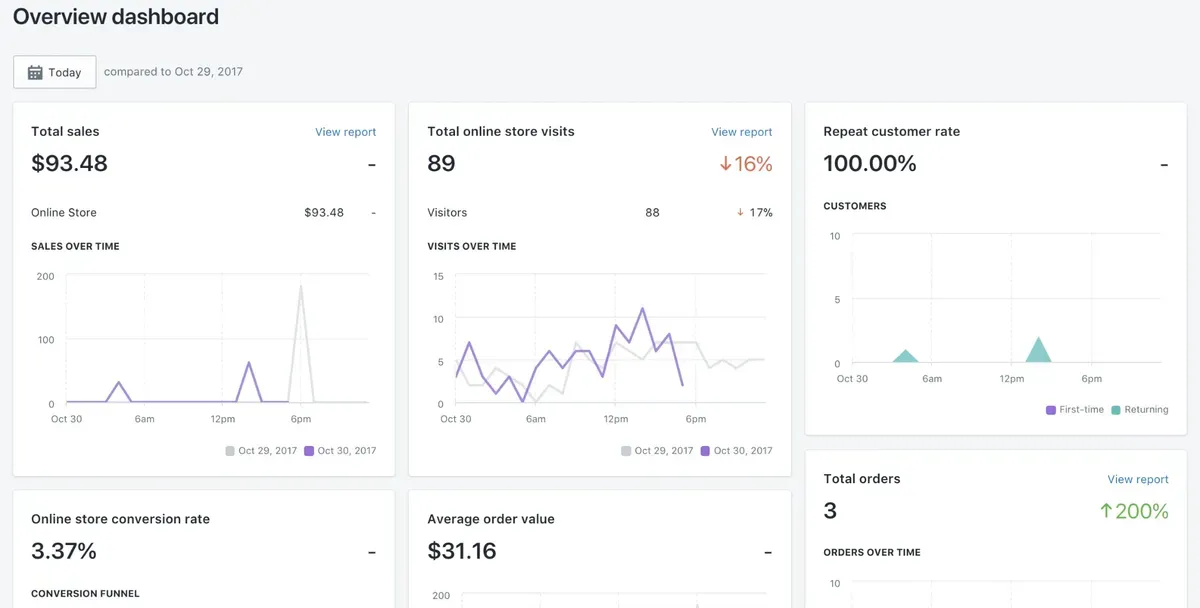
Shopify does not charge extra fees just for selling digital products. Unlike physical goods, converting a Shopify ebook into a product does not require printing, packaging, or shipping expenses. This means most revenue stays as profit.
The way Shopify lets sellers automate delivery minimizes labor hours. Once setup finishes, ebooks can be sold around the clock with little ongoing cost, driving strong margins and passive income.
Ability to Sell Ebooks to Customers Worldwide
Shopify supports selling to customers around the globe. It handles multiple currencies and secure payments from many countries. This global reach makes knowing how to sell ebooks on Shopify attractive for sellers targeting international buyers. No matter where a customer is located, digital delivery can be instant. This boosts customer satisfaction and reduces support needs.
Full Control Over Branding and Store Design
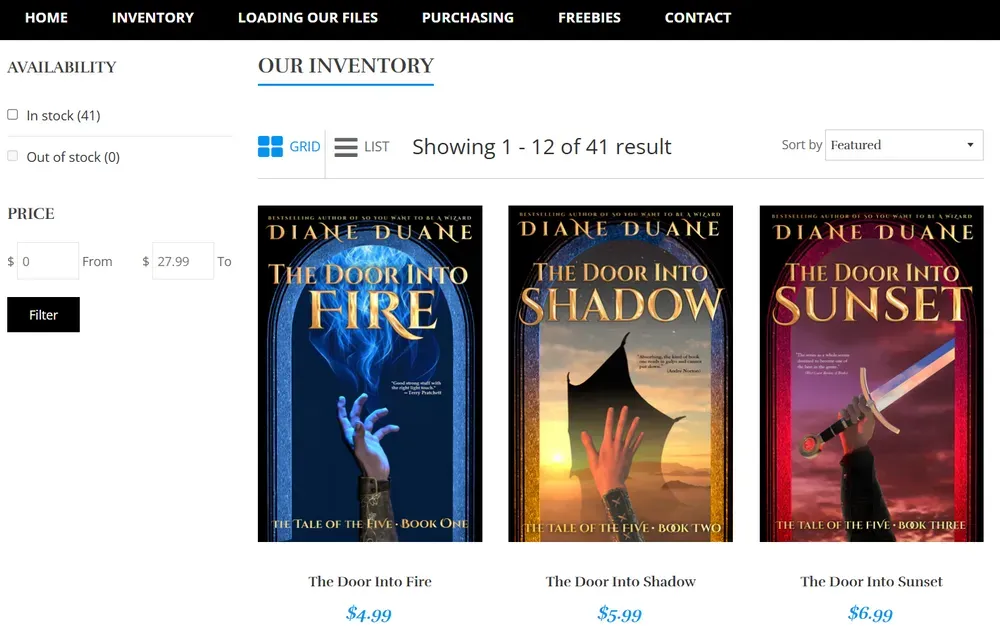
One of Shopify’s biggest advantages is full control over how a store looks. Sellers can choose from many themes and customize them with logos, colors, and layouts that reflect their brand personality. A professional brand presence increases trust and can improve conversions. A cohesive visual identity makes ebooks feel more valuable and encourages buyers to explore more products.
Direct Access to Customer Data and Marketing Channels
Shopify gives direct access to important customer data like email addresses, purchase history, and buying patterns. These insights help refine how to sell ebooks on Shopify with smarter marketing decisions.
Integrated tools let sellers launch email campaigns, create discounts, and follow up with buyers easily. Combining analytics with targeted marketing improves conversions and builds long-term relationships.
Reduced Payment Processing and Platform Fees
Shopify’s built‑in payment processing is secure and reliable. Sellers can accept credit cards and digital wallets without juggling multiple services. There are no additional platform fees for digital products beyond normal subscription and payment processing charges. That means more of each sale goes toward revenue rather than platform costs.
Complete Freedom to Set Prices and Run Promotions
Digital products allow flexible pricing strategies. On Shopify, prices can be updated at any time, promotional deals launched, and bundling offers tested. Running promotions like “buy two get one free” or limited‑time discounts can attract buyers and boost conversions. This pricing freedom helps keep ebook sales competitive.
Easy Content Updates and Product Management
Updating an ebook on Shopify is straightforward. Simply replace the old file with a new one in the product dashboard. Customers always receive the latest version without delay. The ability to manage multiple ebooks from one dashboard simplifies inventory and product updates. Sellers can quickly add new titles or revise content in minutes.
Seamless Connection with Marketing and Sales Apps
Shopify’s app marketplace includes tools for email campaigns, SEO improvement, social media ads, and analytics integration. These apps expand sales reach and improve conversions. Apps for digital file delivery also make instant downloads reliable and professional. Together, these integrations streamline operations and enhance customer experience.
What You Need Before Selling Ebooks on Shopify
Before launching, key elements must be ready. These basics ensure a smooth setup for anyone learning how to sell ebooks on Shopify. Prepare the following items before going live:
Shopify store with a plan: A paid plan lets the store stay live and accept orders.
Digital delivery solution: Install a digital download app so customers receive files automatically. Shopify’s Digital Downloads app is a common choice.
Ebook files ready: Have your ebook formatted (PDF, EPUB, MOBI) and polished for delivery.
Product listings: Write clear titles, descriptions, and upload cover images for each ebook.
Payment setup: Activate Shopify Payments or another gateway to accept sales online.
Tax setup: Configure tax settings for digital products, especially for international sales.
How to Sell Ebooks on Shopify (Step-by-Step)
Selling ebooks on Shopify is simple when each step is done in the right order. Below is a clear, step‑by‑step guide on how to sell ebooks on Shopify. Follow these steps to launch a professional ebook Shopify business and start earning money from digital downloads.
Step 1: Set Up Your Shopify Online Store
Start by signing up for a free Shopify trial. This trial helps test how to sell ebooks on Shopify before committing to a paid plan.
Complete the basic setup during the trial:
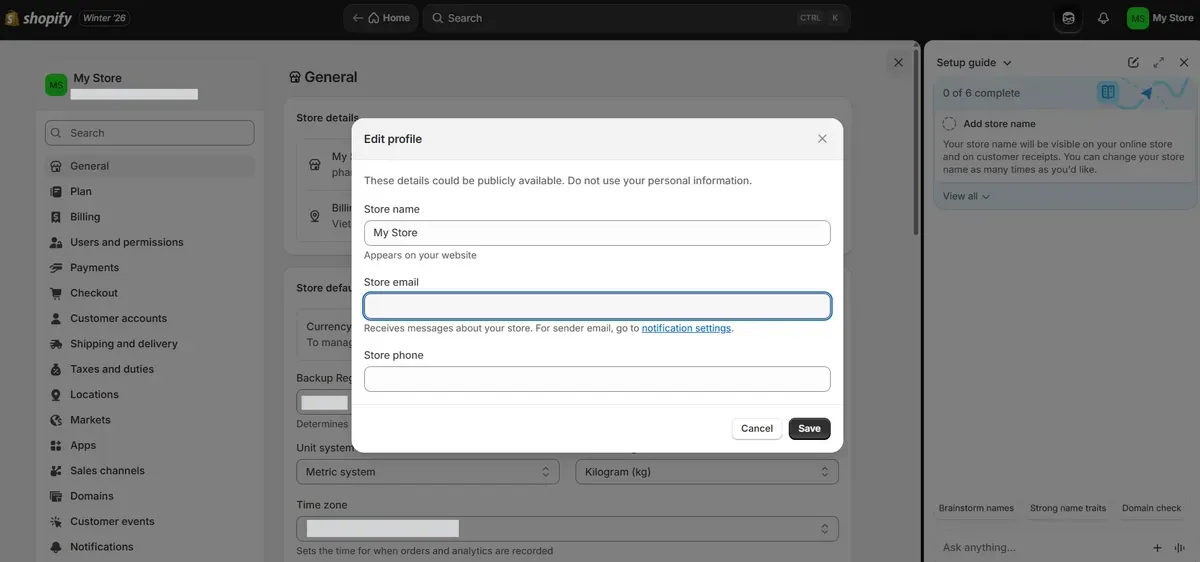
Choose a store name and default currency
Add core pages like About, Contact, and Policies
Customize the layout using Shopify’s drag-and-drop theme editor
After the trial ends, select a paid plan such as Basic, Shopify, or Advanced based on budget and growth needs. Then optimize page titles, meta descriptions, and tags to support SEO and organic traffic.
Step 2: Add a Digital Download App to Enable Ebook Delivery
Shopify requires a digital delivery app to sell ebooks. Visit the Shopify App Store and install apps like Digital Downloads ‑ Filemonk or Digital Downloads PDF Pendora to deliver files automatically after checkout.
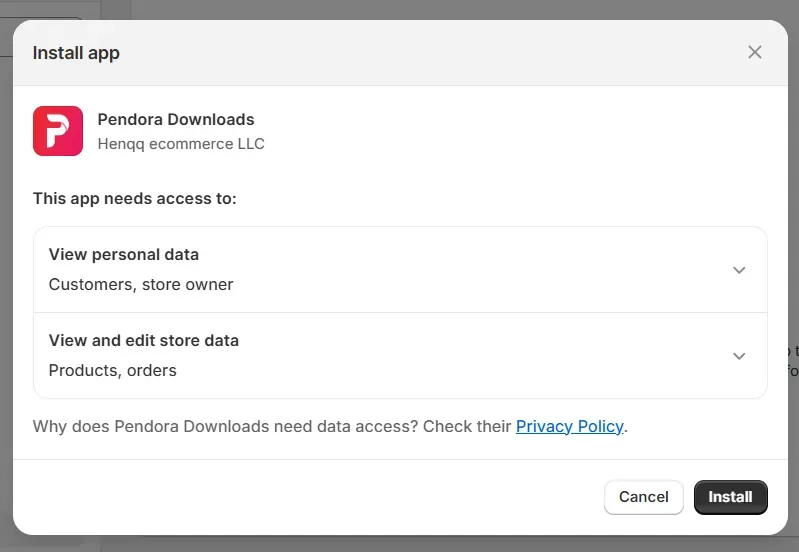
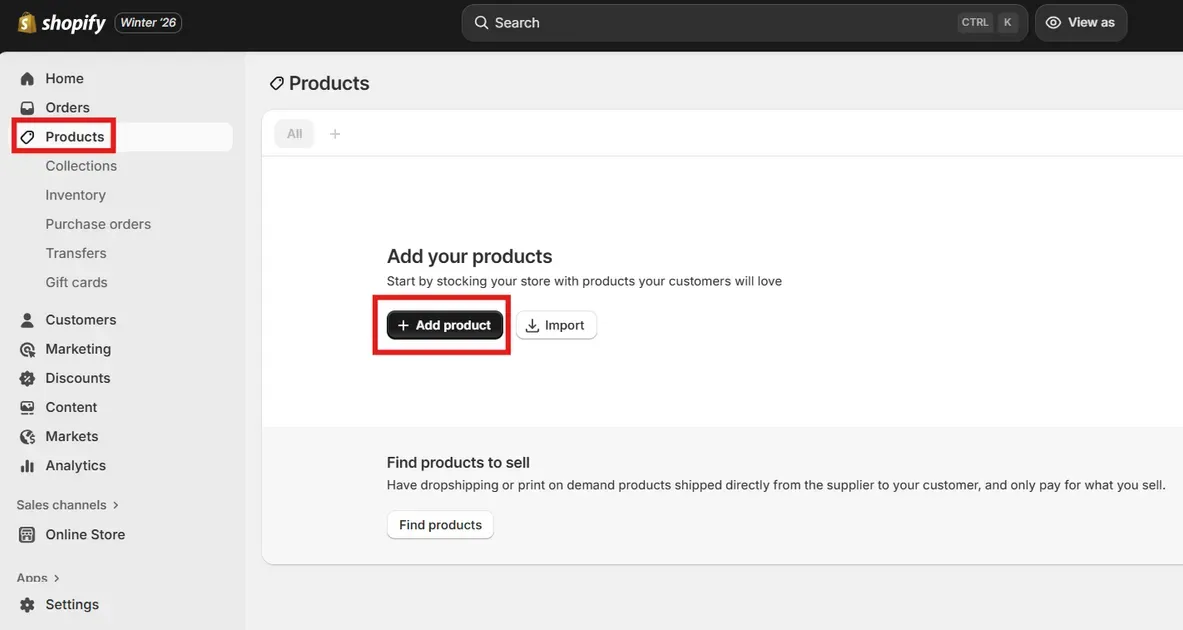
Once installed, begin adding ebooks as products:
- Go to Products → Add product
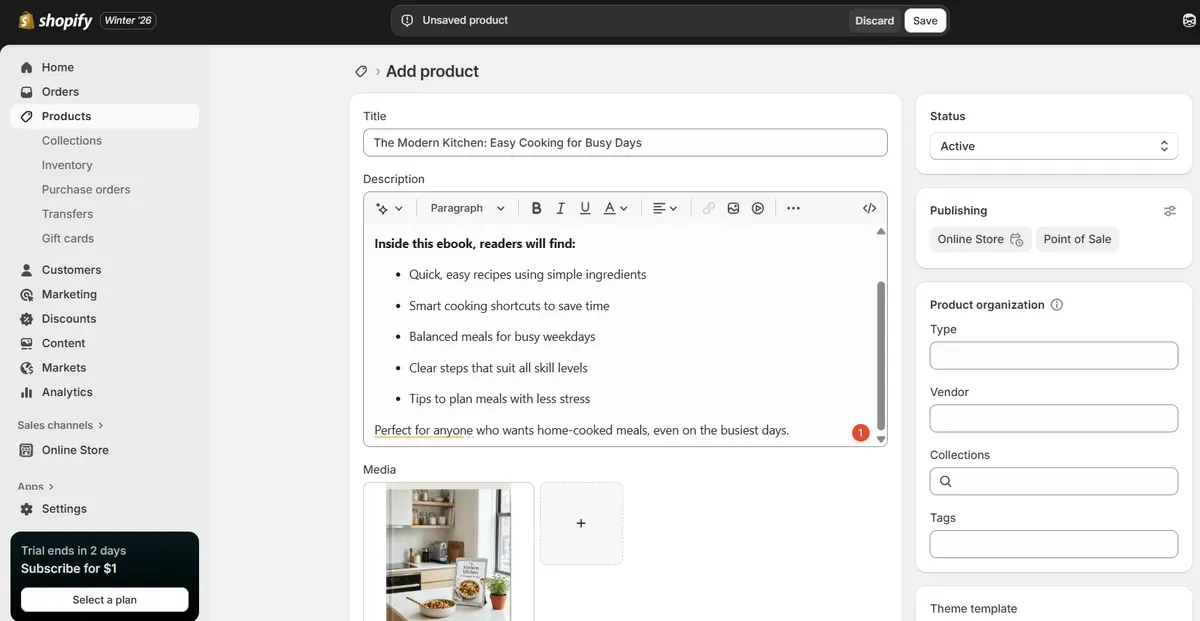
Enter the ebook title, price, and description
Upload the ebook file using the app
Set the product type as a digital product
Configure inventory, tags, and status. Publish each ebook and set it to Active so customers can browse and purchase instantly.
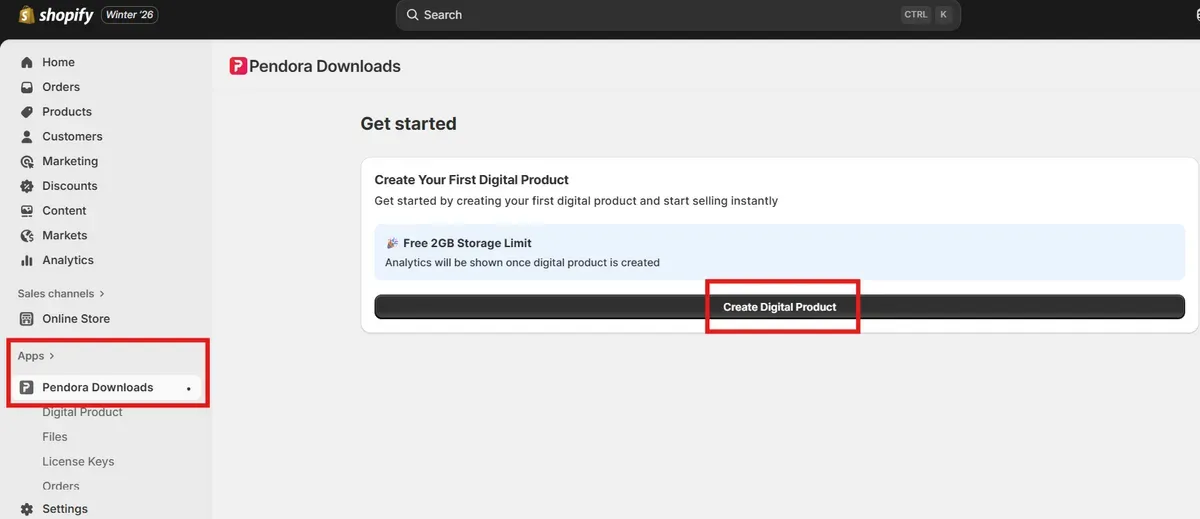
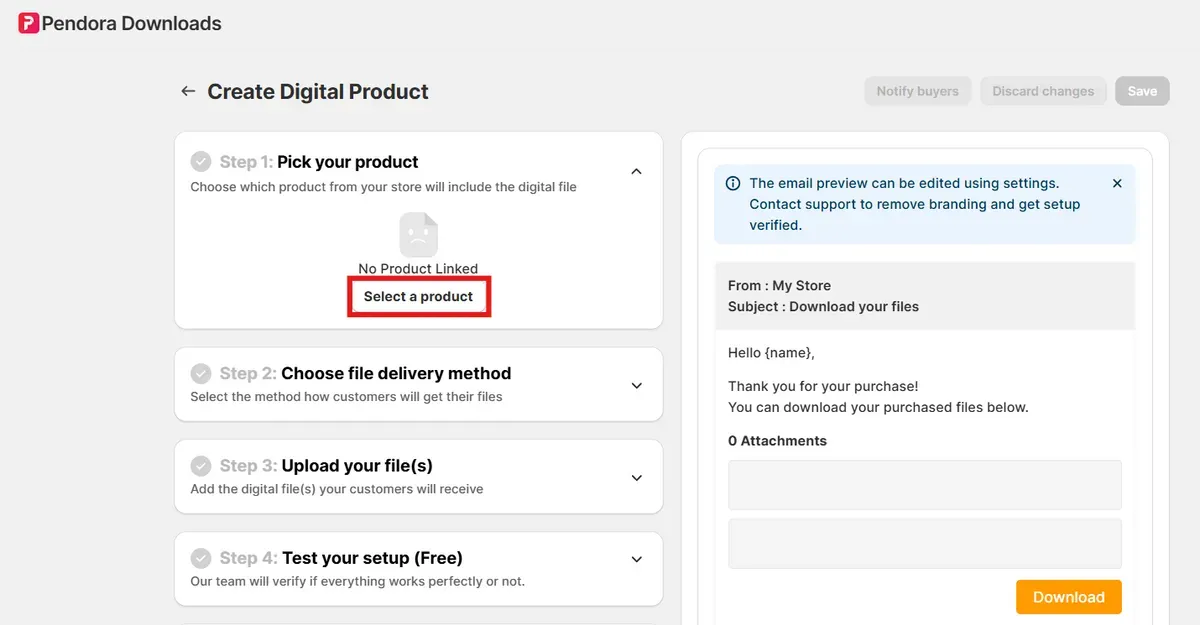
- Go to Pendora Downloads → Create Digital Product.
- Click Select a product.
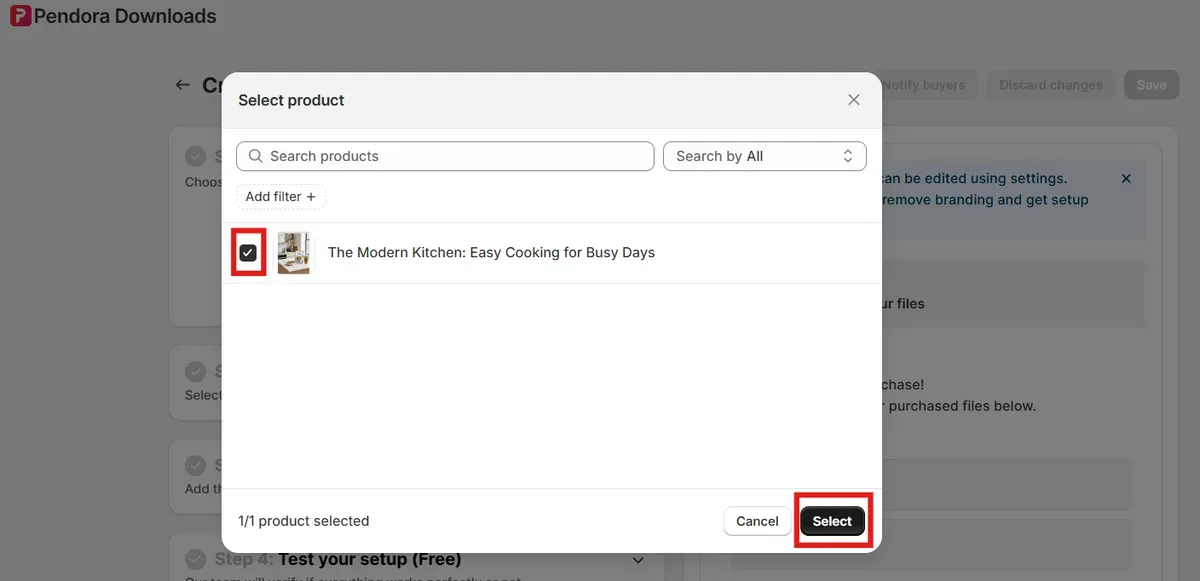
- Add your product and click Select.
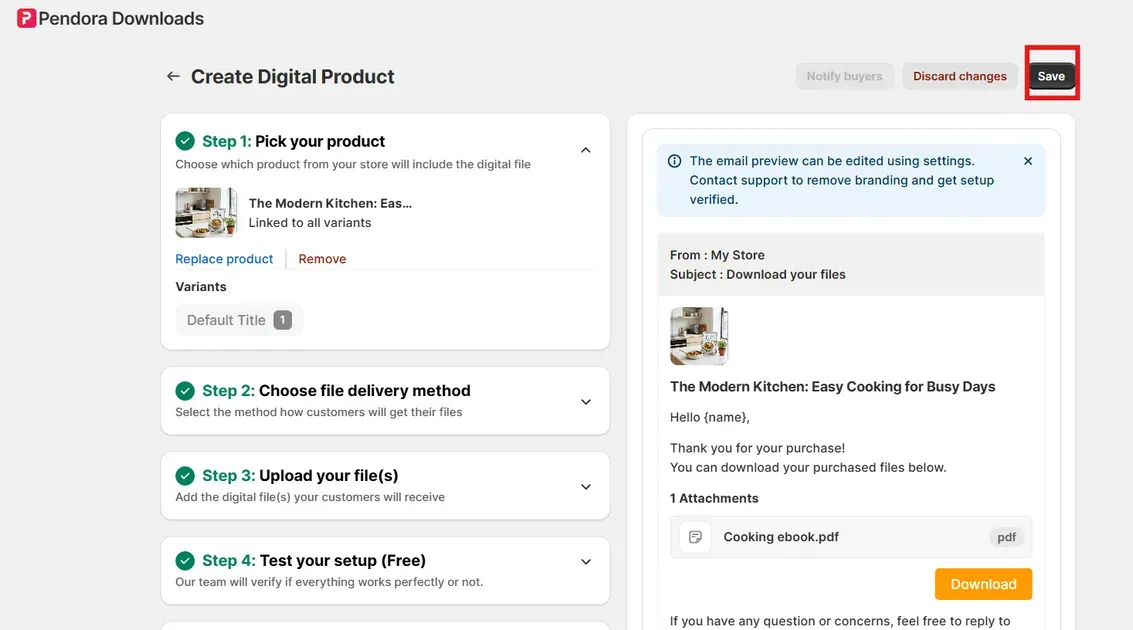
- Follow the recommended steps to complete the process. Click Save.
Step 3: Create a Product Page and Upload Your Ebook
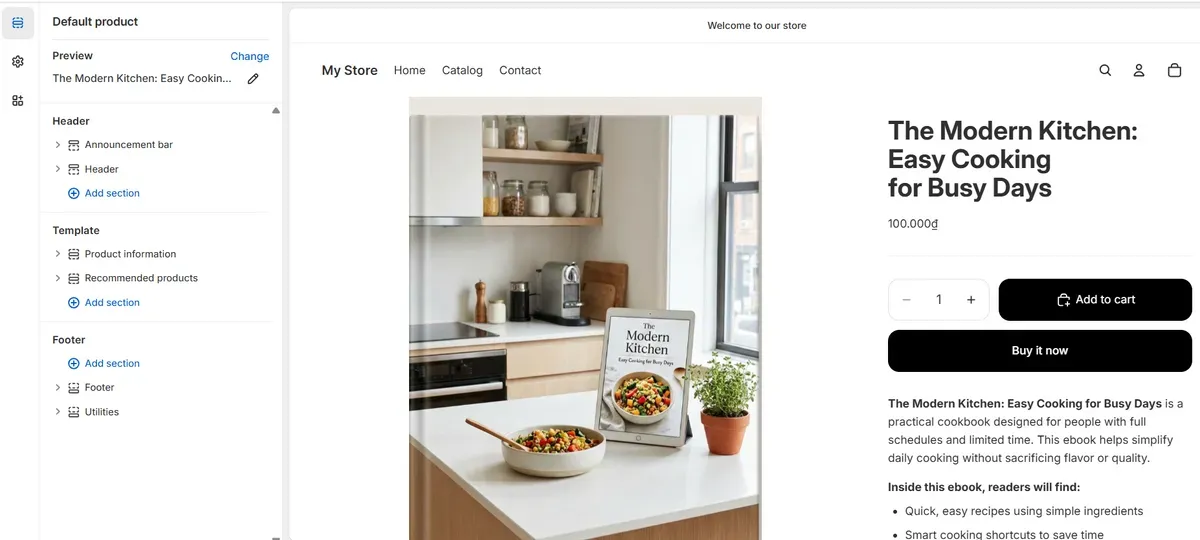
Next, focus on store design to improve trust and conversions. Choose a theme that aligns with brand identity and supports clean layouts for digital products. Shopify allows theme previews before installation, which helps compare styles easily.
Enhance key store areas:
Highlight featured ebooks on the homepage
Add detailed product pages with benefits and previews
Group related ebooks into collections
Use high-quality images, clear menus, banners, and strong call-to-action buttons. Test the design on desktop and mobile devices to ensure a smooth shopping experience.
Step 4: Choose and Configure a Secure Payment Gateway
Navigate to Settings → Payments to select a payment provider. Shopify Payments offers quick setup and supports cards and digital wallets, making it ideal for new ebook stores.
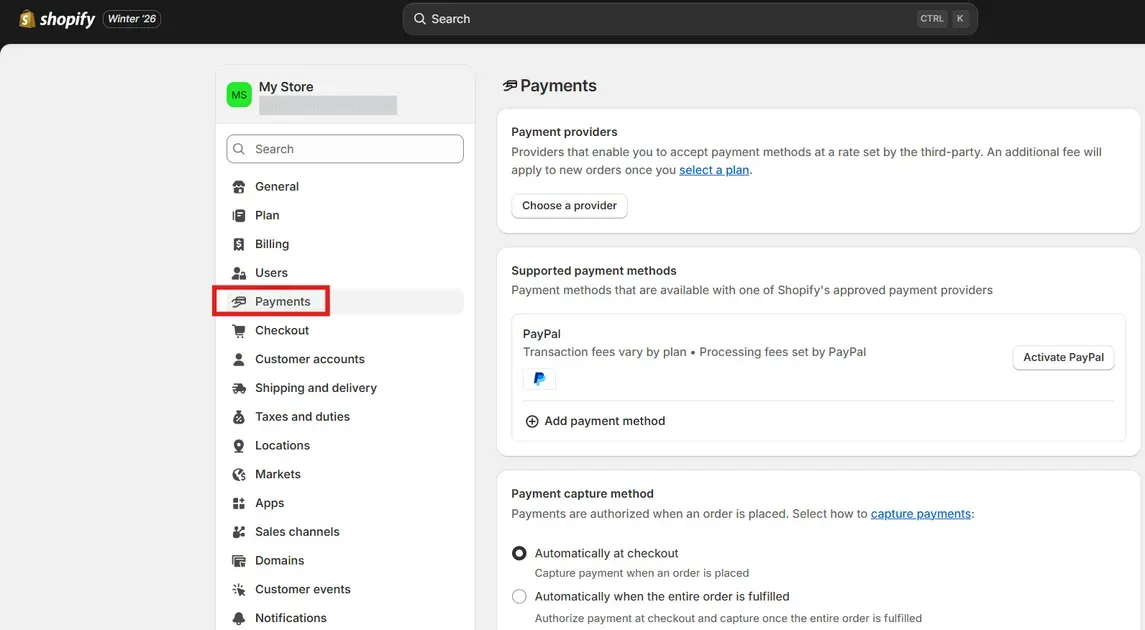
Complete the setup steps:
Enter business and bank details
Enable checkout for digital products
Allow purchases without shipping
Confirm that payment buttons display clearly on product and cart pages. Test checkout flow to ensure a smooth buying experience for customers.
Step 5: Publish and Go Live with Your Ebook Store
Before launch, review all store pages and product listings. Run a test purchase to confirm payment processing and instant ebook delivery work correctly.
Remove storefront password protection and connect a custom domain. A branded domain builds trust and improves credibility for ebook sales.
Step 6: Promote Your Ebook Store to Drive Sales
Promotion plays a key role in learning how to sell ebooks on Shopify successfully. Optimize product pages with SEO keywords and create blog or landing page content to attract search traffic.
Expand reach through:
Email marketing with sample chapters
Social media posts and ads
Limited-time discounts or bundles
Track performance using Shopify analytics and adjust pricing or messaging based on data. Consistent promotion turns visitors into long-term ebook buyers. Now, you know how to sell ebooks on Shopify!
5 Tips for Higher Ebook Conversion Rates on Shopify
After learning how to sell ebooks on Shopify, let’s explore tips for higher conversion rates. Boosting sales goes beyond just listing ebooks on Shopify. Small changes to your store and product pages can make a big difference in how many visitors turn into buyers.
Below are five effective tips that help increase conversions and improve the buying experience for digital products like ebooks.
#1. Design a Clean and User-Friendly Store Layout
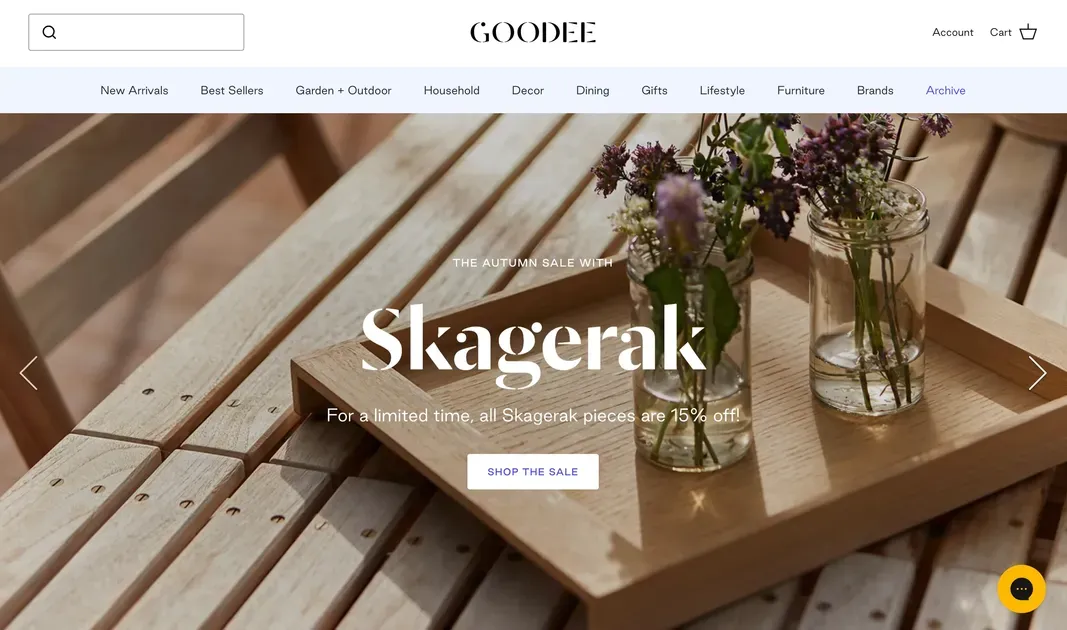
Before learning how to sell ebooks on Shopify, remember that a clean store layout guides visitors easily from the homepage to purchase. Clear menus and simple navigation reduce confusion and help shoppers find ebooks fast. Placing key elements where shoppers expect them makes browsing more intuitive and increases the chance of a sale.
Keep the homepage and product pages uncluttered. Use headings, bullet points, and short blocks of text to make information easy to scan and understand quickly. A well‑structured layout keeps shoppers engaged longer.
#2. Use High-Quality Visuals and Compelling Ebook Descriptions
Visuals matter even for digital products. A sharp ebook cover and attractive graphics create a strong first impression. High‑quality images and mockups show professionalism and build trust in the product’s value. Descriptions should focus on benefits, not just features. Explain what readers gain from the ebook in clear, persuasive words. Use simple sentence structures to make benefits obvious and convincing.
#3. Automate Ebook Delivery for a Seamless Customer Experience
Instant delivery builds trust and satisfaction and reduces support requests when you sell ebooks. Set up a digital delivery app that sends ebooks automatically after purchase. This automation creates a smooth experience that feels modern and professional.
#4. Increase Order Value with Bundles and Upsell Offers
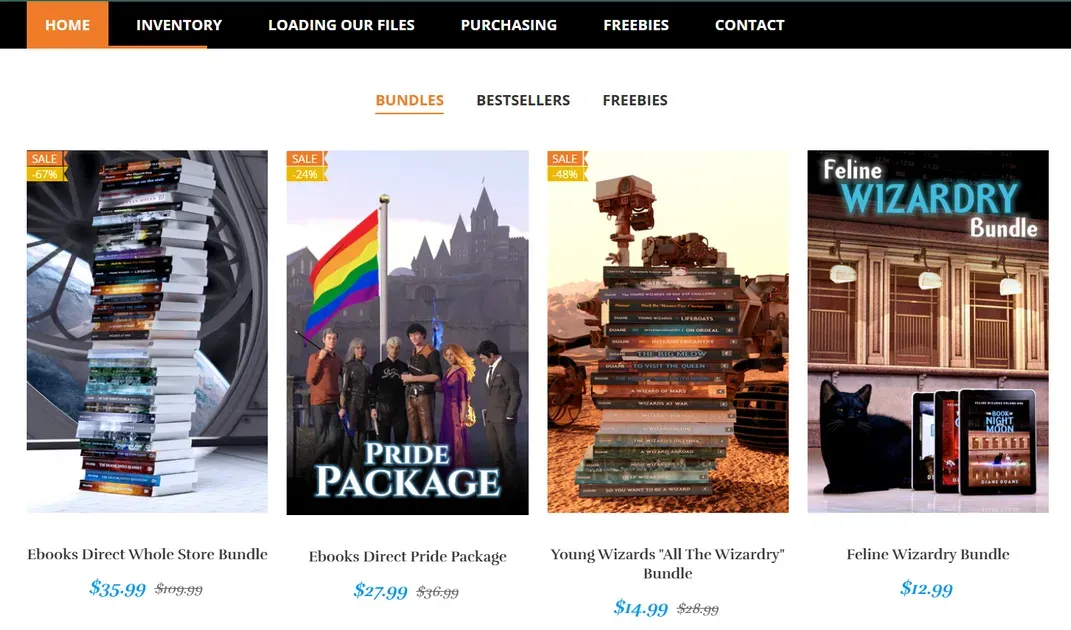
Offering bundles and upsells boosts average order value. Remember this when you learn how to sell ebooks on Shopify. Present options like “Buy this ebook + companion workbook” or “Get three ebooks at a discount.” This gives buyers more value and encourages larger purchases. Keep bundle choices simple and clearly show savings. Highlight how much the buyer saves compared to buying each item alone. This makes the offer feel smart and attractive.
#5. Attract Buyers with Free Samples and Preview Access
Letting shoppers see a snippet of content builds trust and interest. Offering a free chapter or sample preview helps them understand the value before purchasing. This lowers hesitation and boosts the chance they will buy. When learning how to sell ebooks on Shopify, note that samples also give visitors a taste of style and quality. When the preview delivers real value, many readers are more willing to complete the purchase.
Successful Examples of Ebook Sellers Using Shopify
QUB livre

QUB livre is a Quebec-based online bookstore with a diverse catalog of French and translated books spanning fiction, biographies, and lifestyle guides. The store highlights frequent new releases, best-selling categories, and seasonal collections that encourage repeat visits and purchases. QUB livre also promotes loyalty via social media engagement and newsletter updates to drive ongoing traffic and customer interest.
A Box of Stories
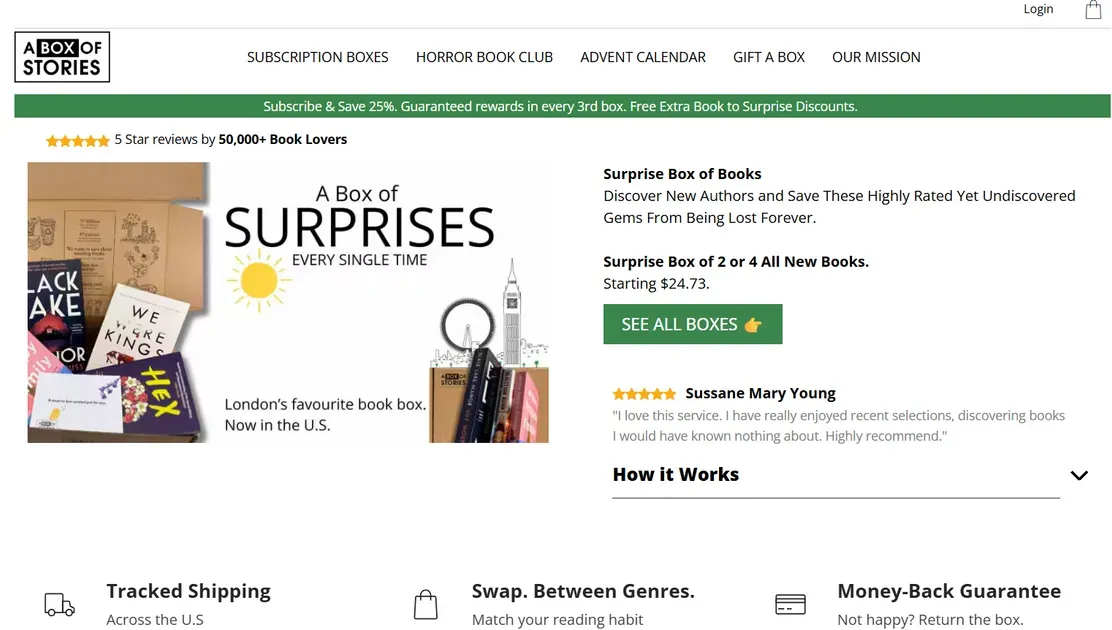
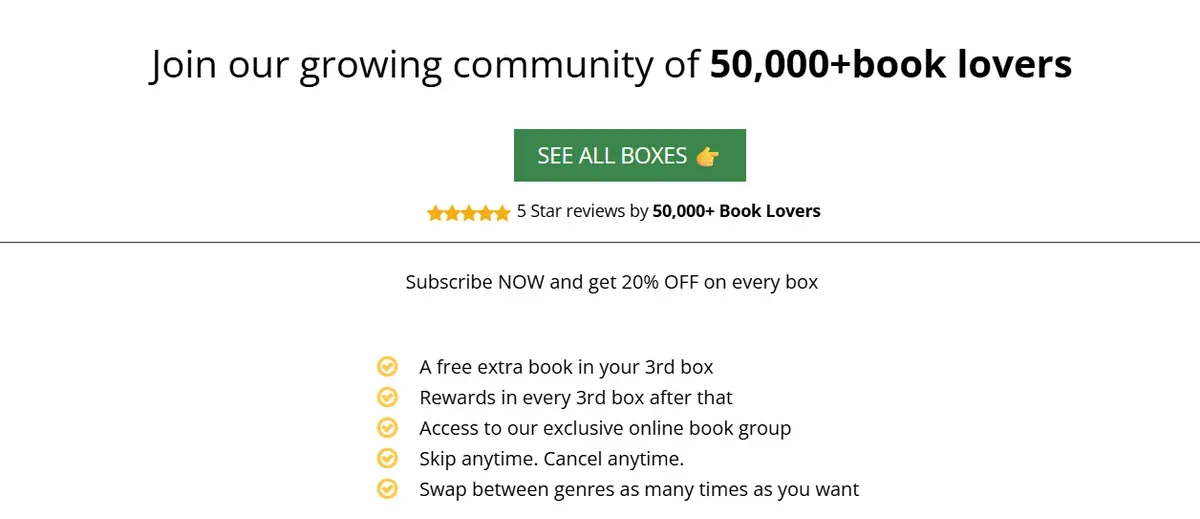
A Box of Stories combines curated book boxes with curated ebook and paperback offerings to build a community of over 50,000+ book lovers with strong 5-star reviews. The brand’s model focuses on discovery and surprise, which has helped earn consistent praise and repeat orders. Many customers have left 4.7+ star ratings on independent review platforms, reflecting a high level of satisfaction and engagement.
The Banana Girl

The Banana Girl leverages influencer branding and digital content to sell health- and lifestyle-focused ebooks on Shopify. This store has built a loyal audience by pairing expertise in vegan living and wellness with clear digital product offerings, expanding reach beyond social platforms into direct ecommerce. Its success shows how personal branding and niche positioning can drive ebook sales on Shopify.
Ebooks Direct
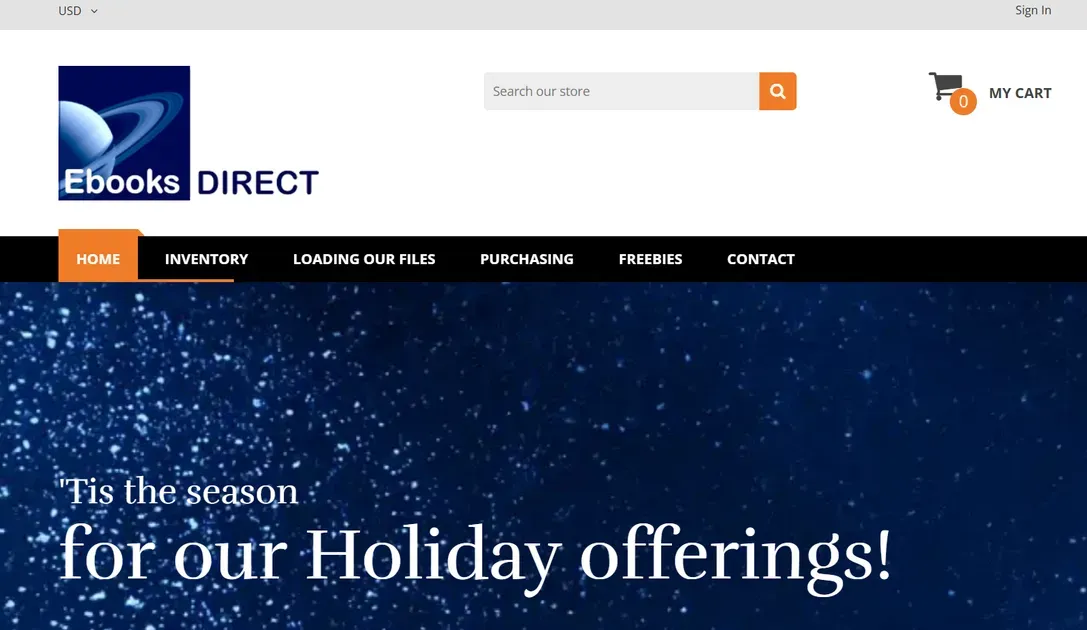
Ebooks Direct has operated digitally since the late 1990s and continues to thrive on Shopify by offering thousands of digital titles across many genres. As a long-standing ebook retailer, it has optimized its Shopify store with clear navigation, streamlined delivery, and a broad selection that caters to diverse reader interests. This illustrates how scale and organization help maintain high traffic and consistent sales.
FAQs about How to Sell Ebooks on Shopify
Can Shopify sell ebooks directly?
Yes. Shopify supports selling digital products like ebooks, but a digital download app must be added to deliver files after purchase. Shopify lets customers download files instantly once the order completes.
What is the best Shopify app for selling ebooks?
Top options include Digital Downloads from Shopify and third-party tools like LDT Digital Downloads & Ebooks for advanced features. These apps help automate delivery and manage ebook files.
Does Shopify charge extra fees for digital products?
Shopify does not charge extra platform fees specifically for digital goods. Standard subscription and payment processing fees still apply with every sale.
Can I limit ebook downloads after purchase?
Yes. Some digital download apps let sellers set a download limit per purchase to control how many times a file can be downloaded.
Can I sell ebooks and physical products together?
Yes. Shopify allows both digital and physical products in the same store. You can sell ebooks alongside printed books, merchandise, or other goods.
The Bottom Line
Learning how to sell ebooks on Shopify becomes much easier with the right tools, clear setup steps, and smart conversion strategies. Shopify offers flexibility, control, and scalability that support long-term digital product growth while keeping costs manageable. With a solid store foundation, strong product pages, and consistent promotion, ebook sales can grow steadily over time. Want to sell ebook on Shopify? Apply these insights and turn a Shopify store into a reliable digital income channel.

Hey! I'm Linda Bui. Join me as we explore tips and tutorials about Shopify apps and Shopify themes for your Shopify store.
Start Building Trust Today
Install the Product Reviews app to improve your store's credibility and boost sales with real customer reviews.
Get Started with Zero CostWhat to not miss out on our blog
Gain insightful knowledge and invaluable experiences from dedicated experts.
(1)_1200x630.webp)
Squarespace vs Shopify: 10 Key Differences (2026 Comparison)
Squarespace vs Shopify 2026: A quick side-by-side comparison of costs, SEO, and sales power to help you choose the right platform for your business scale today

Newsletter
Get all the stories you need-to-know from the most powerful name in news delivered first thing every morning to your inbox