How to Set Up a Wholesale Store on Shopify: 2026 Ultimate Guide
- Is Shopify's Native B2B Still the Best Choice in 2026?
- Step-by-Step: How to Activate Wholesale on Shopify Plus (Native)
- How to Set Up Wholesale on Shopify Basic & Advanced (Non-Plus)
- Maximizing Your B2B Efficiency: The 2026 Profitability Roadmap
- Essential Settings for Every Shopify Wholesale Store
- FAQs: Everything You Need to Know
- Conclusion
In 2026, the line between retail and bulk commerce has blurred, making it more critical than ever to understand how to set up a wholesale store on Shopify to capture growing B2B demand. Whether you are an enterprise brand leveraging Shopify Plus Native B2B or a growing merchant utilizing the latest AI-driven third-party apps, your setup determines your scalability. This guide provides a technical blueprint to configure price lists, automate net terms, and optimize your storefront for high-volume buyers.
Is Shopify's Native B2B Still the Best Choice in 2026?
Some sellers ask themselves is Shopify down in 2026? For years, merchants asking how to set up a wholesale store on Shopify had to choose between "hacky" third-party apps or the premium Shopify Plus price tag. However, as we move through 2026, Shopify has positioned its Native B2B functionality as the gold standard for high-growth brands.
The "Unified Commerce" Advantage
Unlike traditional setups that require a separate "expansion store" or complex tagging systems, Shopify Native allows you to run your D2C and B2B operations from one single admin. This transition is driven by a massive shift in buyer behavior. According to recent B2B E-commerce Forecasts by Forrester, digital-first B2B sales are expected to account for over 25% of all B2B transactions by 2027, totaling nearly $3 trillion in the US alone.
Using a unified platform means:
Shared Inventory: No more syncing errors between your retail and wholesale stock.
Company Profiles: A new data model that allows multiple buyers to shop under one corporate account.
Blazing Speed: Because the logic is "native" (built into the core code), your wholesale checkout is just as fast as your retail one, which is crucial for SEO and conversion.
What’s New in 2026?
Before coming to the main part to learn how to set up a wholesale store on Shopify, let's discover what's new in 2026. The 2026 "Renaissance" update, which introduced features that finally closed the gap with legacy enterprise platforms like Magento:
Payment Requests per Fulfillment: You can now invoice customers for partial shipments—perfect for large orders that ship in stages.
B2B Store Credit: You can issue credit at the company level rather than the individual user level, ensuring authorized buyers can always utilize available funds.
B2B Pickup in Store: Wholesale clients can now choose local warehouse pickup while maintaining their specific negotiated pricing.
Step-by-Step: How to Activate Wholesale on Shopify Plus (Native)
If you are on Shopify Plus, you don’t need to install a separate "Wholesale Channel" app anymore. The power of how to set up a wholesale store on Shopify now lives directly within your Customers and Products menus. Follow these three critical steps to go live.
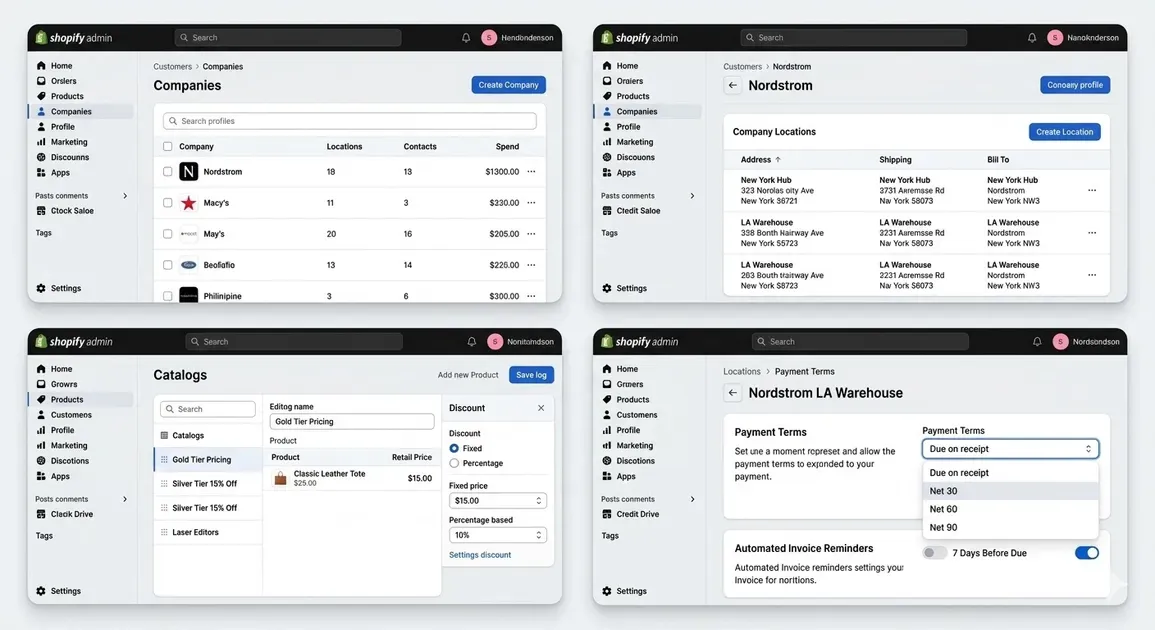
Step by step How to set up a wholesale store on Shopify Plus easily
Creating Company Profiles and Assigning Locations
The foundation of Shopify B2B is the company. Unlike retail, where every customer is an individual, B2B links multiple "Contacts" (employees) to a single "Company."
- Navigate to Customers > Companies: In your Shopify Admin, click "Create company."
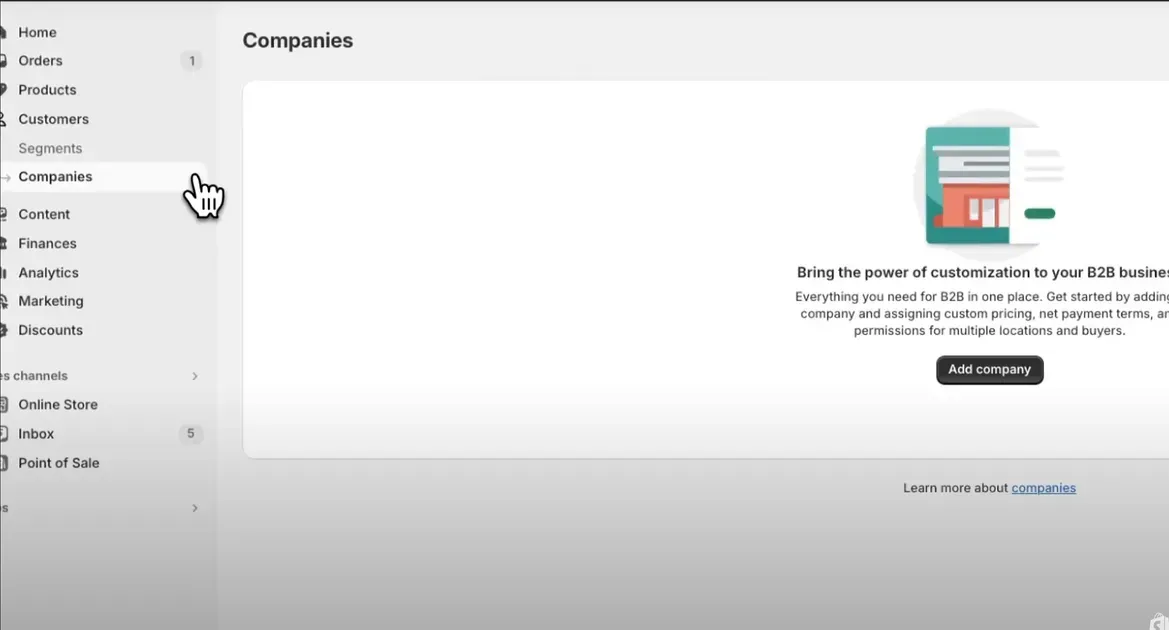
This is the first step in how to set up a wholesale store on Shopify in 2026 guideline
Add Company Details: Enter the business name and a unique ID (optional but recommended for ERP syncing).
Assign Locations: A single company (e.g., "Nordstrom") might have 50 locations. You can set specific shipping addresses and tax IDs for each location.
Invite Contacts: Add the email addresses of the buyers. You can assign permissions here-deciding who can only view orders versus who can actually place them.
Building Custom Price Lists for Different Wholesale Tiers
The biggest challenge in learning how to set up a wholesale store on Shopify is managing complex pricing. Shopify Plus solves this with Catalogs.
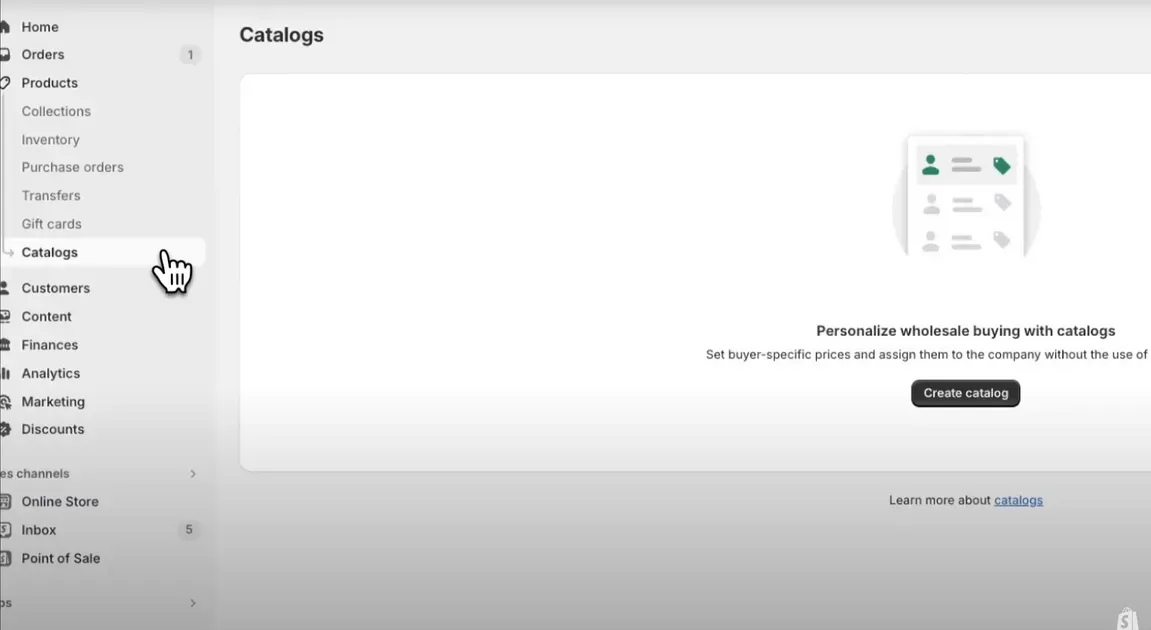
Create a catalog right in this section if you want
Create a Catalog: Go to Products > Catalogs. This acts as your "Master Price List."
Fixed vs. Percentage Discounts: You can choose to offer a flat 20% off the entire store for "Silver" members, or set a fixed price (e.g., $15.00 per unit) for "Gold" members.
Volume Pricing: Use quantity breaks to encourage larger orders. For example:
$1-10$ units: Full Wholesale Price
$11-50$ units: 5% additional discount
$51+$ units: 10% additional discount
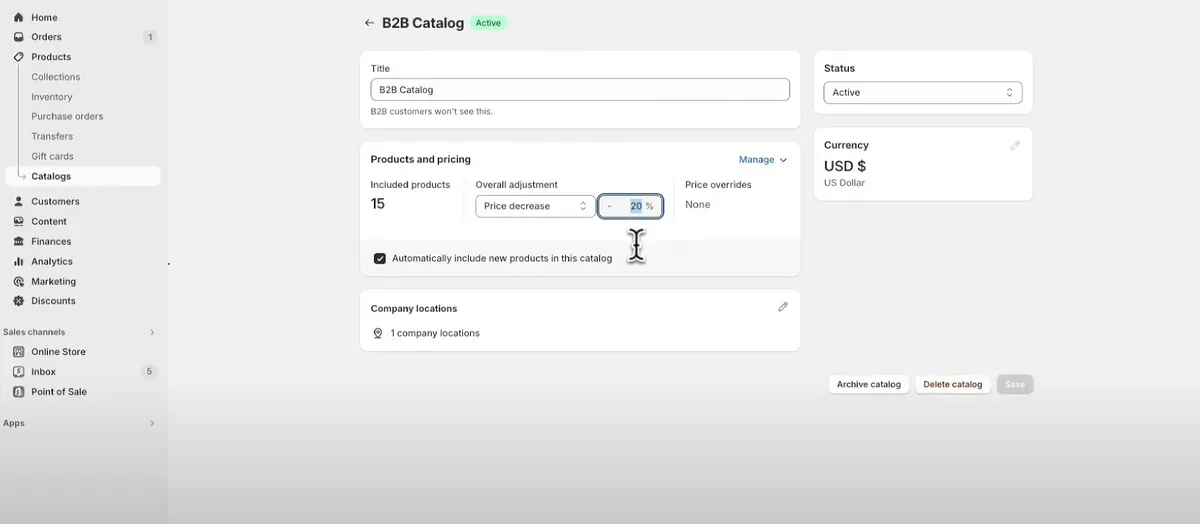
Edit all the pricing information here before coming to the next part
- Assign to Companies: Once your Catalog is ready, link it to the specific Company Profile you created in the previous step.
Setting Up Net Terms (Net 30/60) and Automated Invoicing
Cash flow is king in B2B. Shopify Native allows you to offer credit terms without manual paperwork.
Go to the Company Location: Open the specific company location you want to edit.
Select Payment Terms: Under the "Payment terms" section, select from:
Due on receipt: Customer pays at checkout.
Net 30/60/90: Customer can checkout with $0 today.
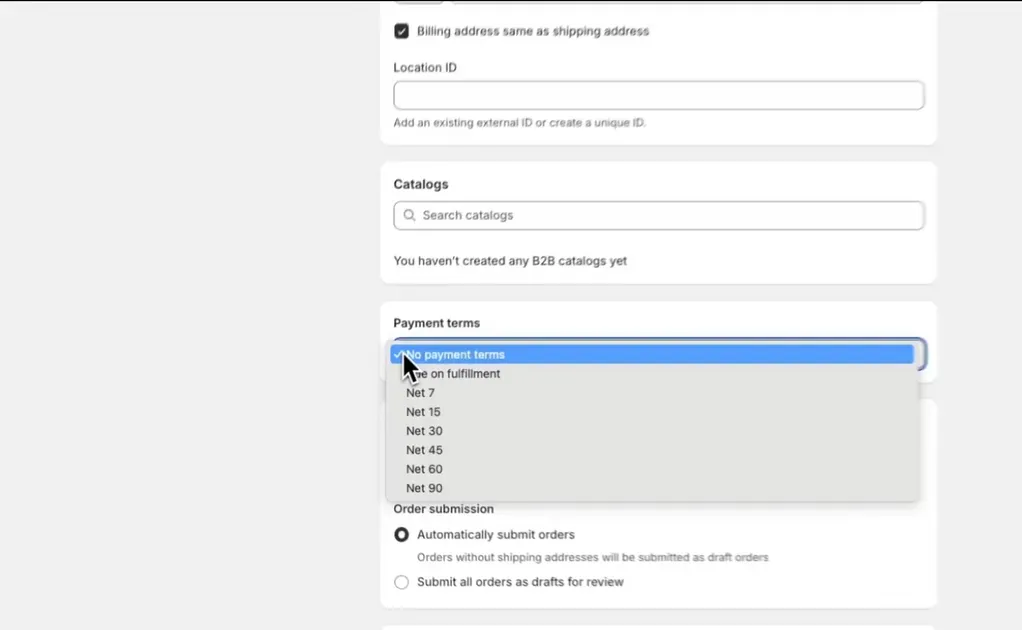
You can choose payment terms in this section to almost complete the process
Automate Reminders: You can set up automated email flows that trigger $7 days before a payment is due, or $1 day after it becomes overdue.
The "Draft Order" Shortcut: If a client calls in an order, you can create a Draft Order, apply their Company Profile, and Shopify will automatically pull in their negotiated price list and net terms.
How to Set Up Wholesale on Shopify Basic & Advanced (Non-Plus)
Since "Native B2B" is restricted to Plus, standard plan merchants must use workarounds to separate retail prices from wholesale discounts. Each method below balances cost, effort, and professional feel.
Using Third-Party Apps to Bridge the B2B Gap
This is the most popular way to learn how to set up a wholesale store on Shopify without upgrading your plan. Apps act as a "layer" over your store to handle B2B logic.
Top 2026 Apps: Look for leaders like BSS B2B Wholesale Solution or Wholesale Gorilla.
Key Features: These apps allow you to "Tag" a customer as "Wholesale." When that customer logs in, the app dynamically swaps the retail price for a wholesale one.
Pros: Easy to set up; supports Net Terms and MOQs (Minimum Order Quantities).
Cons: Monthly app fees ($25–$100+) and potential impact on site loading speed.
The Password-Protected Collection Method: A Free Workaround
If you only have a few wholesale products and a tight budget, you can use Shopify’s built-in features to create a "hidden" shop.
Create a New Collection: Name it "Wholesale" and add your bulk-order products (with wholesale prices already set).
Edit the Theme: Use the Theme Editor to remove this collection from your main navigation and search results.
Password Protect: You can use a "Content Lock" app or a simple password-protected page template.
Manual Ordering: Send the link and password only to verified wholesalers. They "buy" at the listed price, and you fulfill as normal.
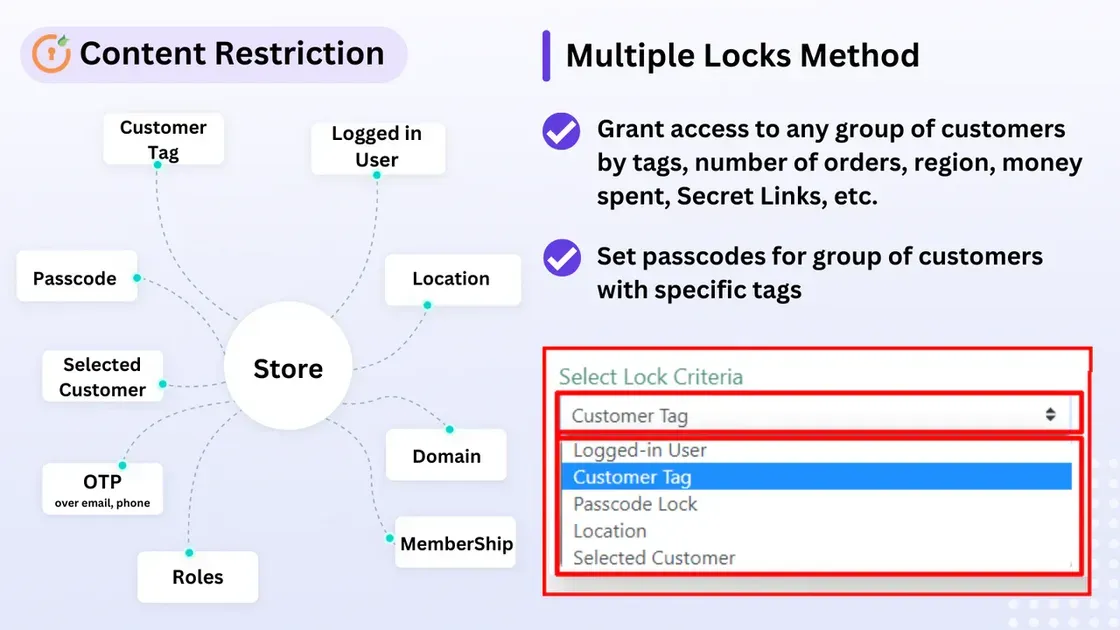
This is how the password-protected collection method works
Maximizing Your B2B Efficiency: The 2026 Profitability Roadmap
Once you understand how to set up a wholesale store on Shopify, the next hurdle is efficiency. B2B buyers don't shop like retail customers; they want speed, repeatability, and zero friction. Here is your 3-phase roadmap to a high-performance wholesale machine.
Phase 1: Customizing the "Trade" Theme for Quick Bulk Orders
In 2026, the "Trade" theme is the gold standard for B2B. Unlike standard themes designed for high-resolution lifestyle imagery, Trade is built for utility.
Quick Order Lists: Instead of clicking through every product page, the Trade theme lets buyers view a list of SKUs with quantity selectors on a single page. To prevent lost B2B revenue during stockouts, you can use Doran Back in Stock | Preorder to automate Email/SMS notifications and capture early sales with custom preorder discounts.
Case Pack Logic: You can set the theme to only allow increments of 6, 12, or 24, preventing "broken cases" in your warehouse.
Search Optimization: The B2B search bar in 2026 is predictive-it suggests SKUs and recently ordered items before the buyer even finishes typing.
Phase 2: Implementing Sidekick AI for Wholesale Pricing Logic
The most revolutionary change in how to set up a wholesale store on Shopify this year is the full integration of Sidekick AI. Managing 5,000 SKUs across 10 different price lists used to take hours of CSV uploads. Now, it takes seconds.
- Natural Language Updates: You can tell Sidekick: "Apply a 15% discount to all winter apparel for my 'Silver Tier' companies, but cap the discount at $500 per order."
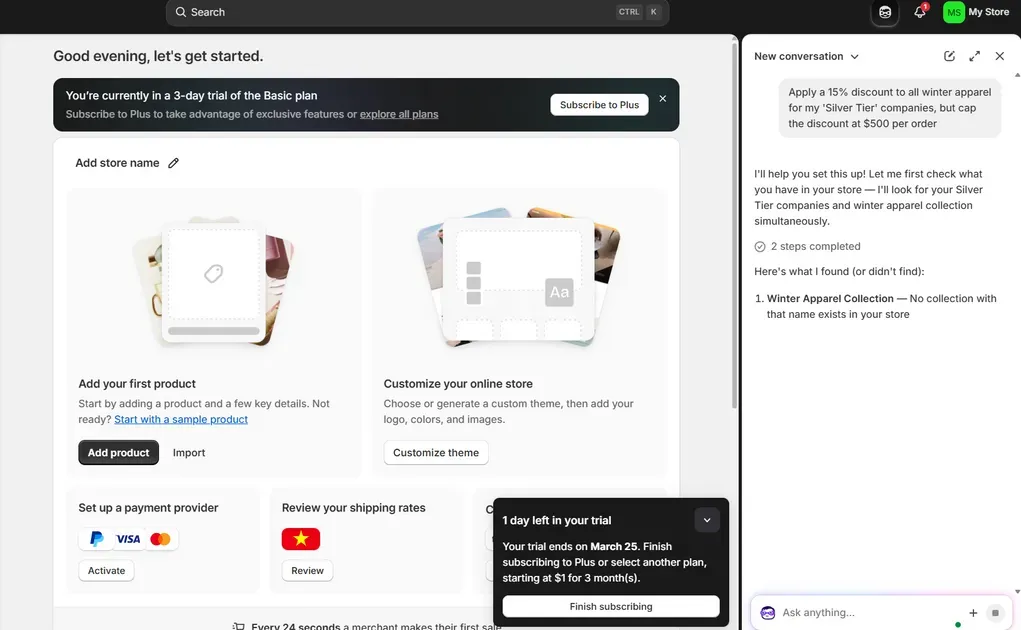
Ask Sidekick AI to help you to set up your pricing strategy
Predictive Pricing: Sidekick analyzes your margins and competitor pricing to suggest the optimal wholesale discount that ensures both a sale and a healthy profit.
Audit Logs: AI keeps a 100% accurate log of every price change, ensuring your B2B reps never accidentally over-discount.
Phase 3: Scaling with Automated Customer Tax Exemptions
Manual tax verification is a massive bottleneck. In 2026, Shopify has automated the Resale Certificate process.
Self-Service Uploads: During the B2B registration or checkout, customers can upload their Tax ID or Resale Certificate directly.
Automatic Verification: Shopify Tax now connects to government databases to verify the validity of the certificate in real-time.
Tag-Based Exemptions: Once verified, the customer is automatically tagged as "Tax Exempt," ensuring their orders are processed with $0$ tax without any manual intervention from your team.
Essential Settings for Every Shopify Wholesale Store
Mastering how to set up a wholesale store on Shopify requires going beyond the storefront design. To ensure your B2B operation is profitable and legally compliant, you must configure these three "under-the-hood" settings properly.
Setting Minimum Order Quantities (MOQs) and Case Packs
Wholesale only works if the average order value (AOV) justifies the shipping costs. When researching how to set up a wholesale store on Shopify, many merchants overlook the "Order Rules" section.
How to Set MOQs: In the Products section of your Shopify Admin, you can now set a "Minimum order quantity" for specific variants.
Case Pack Increments: Beyond just a minimum, you can require "Increments" (e.g., multiples of 6).
Stockout Strategy: To ensure these rules don't block revenue, you can use third parties' support to allow buyers to commit to case packs even before they hit the warehouse floor. For example, you can use Doran to set up a preorder campaign for specific collections to ensure your good stockout strategy.
Configuring B2B-Specific Shipping Rates and Rules
A critical step in how to set up a wholesale store on Shopify is separating your retail parcel rates from your B2B freight costs.
Carrier-Calculated Rates: Connect LTL (Less-Than-Truckload) accounts to Shopify for real-time freight quotes.
Flat Rate Tiers: Set rules like "Free Freight on orders over $2,000" or a flat handling fee for small bulk orders.
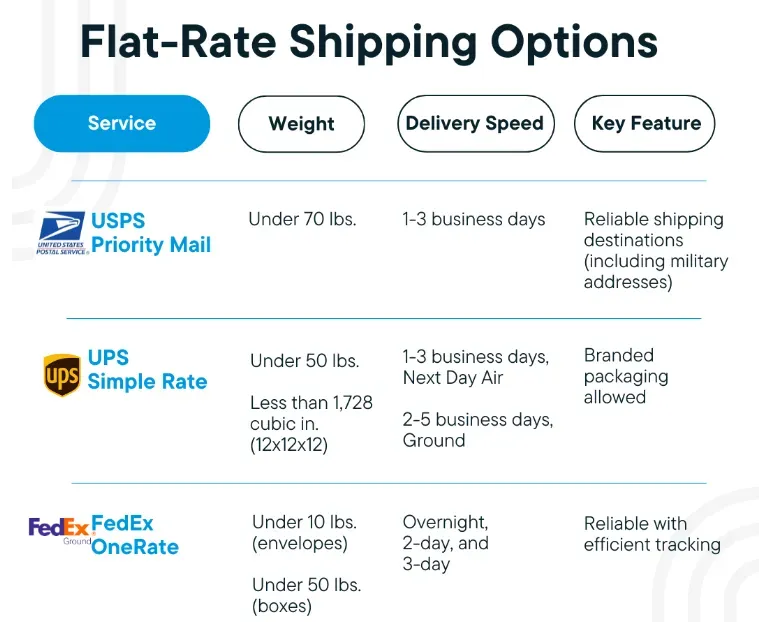
This is a quick comparison of th_e flat rates among some delivery companies_
- Local Pickup: Enable "Warehouse Pickup" specifically for your B2B segment to eliminate logistics costs.
How to Sync Wholesale Orders with Your ERP or Warehouse
If you are learning how to set up a wholesale store on Shopify for a high-volume brand, manual data entry is your biggest enemy. You need a seamless bridge to your backend.
Native API Connections: Use Shopify’s B2B APIs to sync orders directly with ERPs like NetSuite or Microsoft Dynamics 365.
Inventory Flow: Ensure your ERP pushes stock updates to Shopify every few minutes to prevent overselling to retail customers.
Automated Fulfillment: Set "B2B Locations" to automatically route orders to the nearest distribution center.
Understanding how to set up a wholesale store on Shopify means preparing for scale, and these three settings provide the professional infrastructure your business needs to grow.
FAQs: Everything You Need to Know
Navigating how to set up a wholesale store on Shopify often leads to these common technical questions. Here is the quick breakdown for 2026.
Can I offer wholesale and retail on the same domain?
Yes. Using Shopify Plus Native B2B, you can run both on one domain. For non-Plus users learning how to set up a wholesale store on Shopify, you can use apps or a dedicated "Expansion" subdomain to separate the experiences.
Does Shopify charge extra for B2B transactions?
No additional transaction fees apply beyond your standard plan rates. However, if you choose how to set up a wholesale store on Shopify using third-party apps, you will need to factor in their monthly subscription costs.
How do I verify wholesale customers before they buy?
You can use a "B2B Registration Form" to collect Tax IDs and business licenses. Access is only granted once you manually approve their Company Profile in the admin.
Is it possible to hide wholesale prices from Google?
Yes. By requiring a login to view B2B catalogs, your wholesale pricing remains invisible to search engine crawlers and retail shoppers.
Can I use Shopify Collective for wholesale sourcing?
Absolutely. Shopify Collective allows you to stock products from other brands at wholesale prices and sell them on your store without holding inventory.
Conclusion
In 2026, knowing how to set up a wholesale store on Shopify is the fastest way to scale your brand’s revenue and capture high-volume B2B demand. By transitioning from manual spreadsheets to a unified digital portal, you provide the professional, self-service experience that modern business buyers now expect.
Whether you are leveraging the enterprise power of Shopify Plus or using smart workarounds on a Basic plan, the goal remains the same: automate your workflows and remove friction at checkout.

Hey! I'm Linda Bui. Join me as we explore tips and tutorials about Shopify apps and Shopify themes for your Shopify store.
Start Building Trust Today
Install the Product Reviews app to improve your store's credibility and boost sales with real customer reviews.
Get Started with Zero CostWhat to not miss out on our blog
Gain insightful knowledge and invaluable experiences from dedicated experts.
(1)_1200x630.webp)
Squarespace vs Shopify: 10 Key Differences (2026 Comparison)
Squarespace vs Shopify 2026: A quick side-by-side comparison of costs, SEO, and sales power to help you choose the right platform for your business scale today

_1200x630.webp)
Newsletter
Get all the stories you need-to-know from the most powerful name in news delivered first thing every morning to your inbox