Squarespace vs Shopify: 10 Key Differences (2026 Comparison)
Choosing between Squarespace and Shopify often feels like being stuck at a digital crossroads: one path leads to a sleek, high-end art gallery, while the other leads to a massive, global distribution warehouse. The "best" platform doesn't actually exist; there is only the platform that aligns with your specific business DNA. If you are a creator prioritizing aesthetics and simplicity, Squarespace is likely your home. However, if you are an entrepreneur aiming for high-volume sales and complex operations, Shopify is your engine. This guide breaks down the 10 critical differences between Squarespace vs Shopify that help you make a decision easier.
At a Glance: Squarespace vs Shopify Comparison Matrix (2026)
Before analyzing Squarespace vs Shopify, which platform is better, here is a quick look at how they stack up for 2026
| Key Difference | Squarespace | Shopify | Which is better? |
|---|---|---|---|
| Pricing | From $14 to $32 per month | From $19 to $2300 per month | Squarespace |
| Ease of Use | Visual, "no-code" creative playground. | Logic-driven, steeper learning curve. | Squarespace |
| Themes and Designs |
|
| Shopify |
| eCommerce Capacities | Best for digital services or boutiques. | Better choices for all types of products, even digital products Shopify store, thanks to many sales tools | Shopify |
| Ecosystem | Just around 40+ extensions, but curated and high-quality. | 8,000+ Apps for users to customize limitless. | Shopify |
| Payment Gateways | 3 options for credit card: Stripe, PayPal, and Squarespace payment. | 100+ global gateways for shop owners. | Shopify |
| Dropshipping/POD | Niche and curated integrations. | Deep supply chain automation. | Shopify |
| Omnichannel POS | Good for pop-ups via Square. | Professional-grade retail hardware. | Shopify |
| Customer Support | 24/7 Chat, Email, Help Center. | 24/7 Phone, Chat, Help Center, Forum, Email. | Draw |
| Marketing and SEO | Basic, easy to use, and best for SEO content and Email marketing | Optimized for high-intent search, paid ads, and conversion funnels | Shopify |
Squarespace vs Shopify: Analyzing the 10 Key Differences
Now that you’ve seen the big picture, let’s dive into the details of each key difference. As we go, think about which one actually fits your goals and how you plan to run your business.
Pricing & Total Cost of Ownership
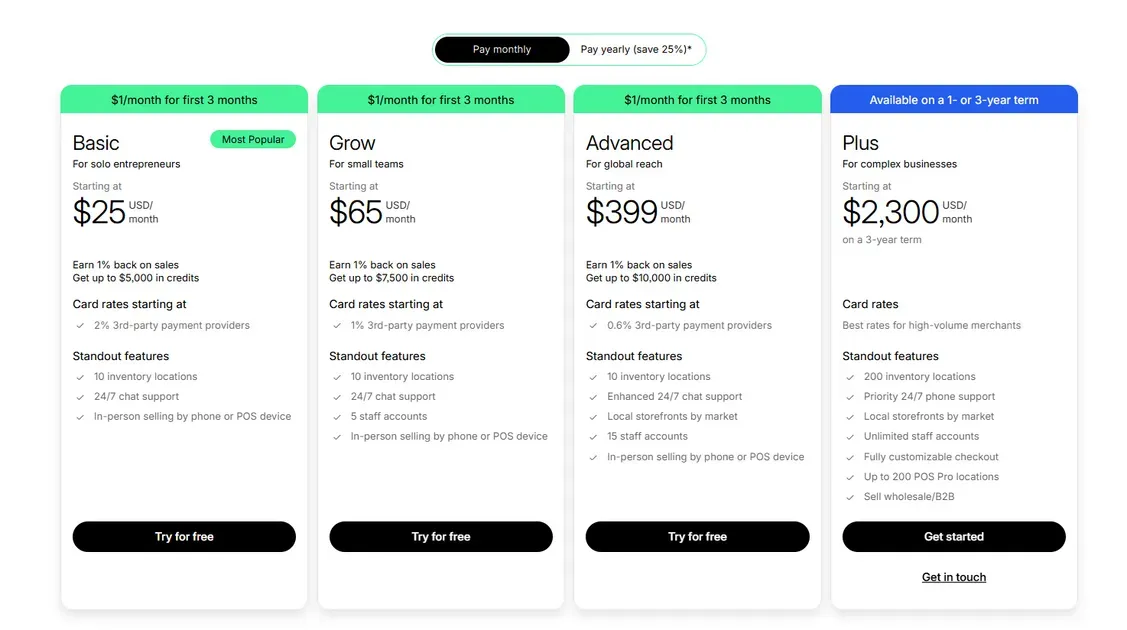
In 2026, you shouldn't just look at the monthly subscription price. The "Total Cost of Ownership" includes three components: your plan, your transaction fees, and the cost of any additional tools (apps) you need to purchase. Shopify vs. Squarespace pricing is always the first thing owners consider, so let's take a closer look.
| Pay Monthly | Pay Yearly | |||
|---|---|---|---|---|
| Shopify | Squarespace | Shopify | Squarespace | |
| Basic | $25 | $14 | $19 | $10 |
| Grow/Core | $65 | $20 | $49 | $14 |
| Advanced | $399 | $32 | $299 | $23 |
| Plus | Starting at $2300 | X | Starting at $2300 | X |
Shopify pricing and total cost of ownership
Shopify has a base monthly price, but that is rarely your final cost. It is designed for businesses that want to pick and choose specialized tools.
The Plans: As of early 2026, the Basic plan is $25/mo (billed monthly). If you pay yearly, you save 25%, bringing it down to roughly $19/mo.
The Promo: New users can currently start for $1/month for the first 3 months on the Basic, Grow, and Advanced plans.
The Fees: If you use Shopify Payments, you pay 0% in extra transaction fees. However, if you use a 3rd-party provider, you pay a fee based on your plan: 2% for Basic, 1% for Grow, and 0.6% for Advanced.
The Apps: This is where the cost adds up. If you want features like product reviews, advanced discounts, or a loyalty program, you will likely need to pay for 3rd-party apps. These often cost between $5 and $50 each per month.
Squarespace pricing and total cost of ownership
Squarespace is built for simplicity. You pay one monthly price, and almost every feature you need is included.
The Plans: Most sellers choose the Core plan (~$20/mo). If you pay yearly, this drops to $14/mo.
The Fees: Squarespace Core has a 0% transaction fee on physical products. If you are on the cheaper "Basic" plan ($25/mo), they take 2% of every sale. The digital content and membership transaction fees for Basic and Core Plans are 7% and 5%, respectively.
The Apps: You don't usually need to buy extra apps. Features like email marketing, pop-ups, and SEO tools are built directly into the system. Your bill stays the same every month.
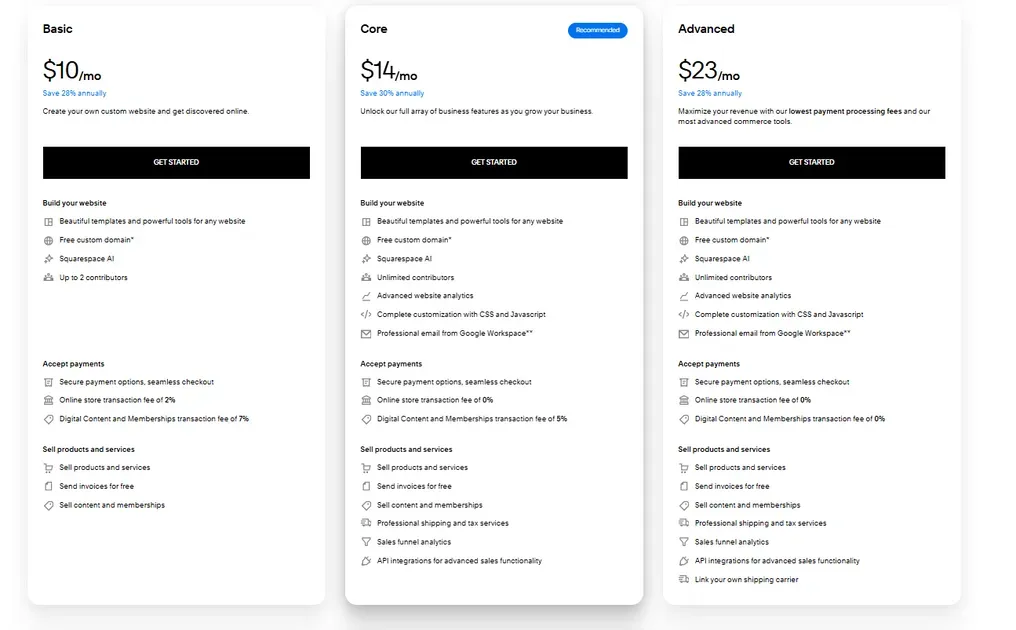
The Verdict: Squarespace is better if you want a fixed, predictable budget. Shopify is better if you want a low starting price ($1/mo promo) but have a larger long-term budget for specialized apps.
Ease of Use and The Learning Curve
Squarespace: The Digital Canvas
Squarespace is built for people who want a beautiful site but don't want to touch a single line of code. It feels like a high-end design tool where everything is visual.
Blueprint AI: When you sign up, you don't start with a blank page. You answer a few questions about your brand, and the AI builds a custom site for you in minutes. It picks the colors, fonts, and even writes the first draft of your copy.
Fluid Engine: This is the heart of the editor. It is a "true" drag-and-drop system using a grid. If you want an image to overlap with a text box or a button to sit exactly in the corner, you just drag it there. It works exactly how your brain expects it to.
Independent Mobile Editing: One of the best features in 2026 is that you can move things around on the mobile version of your site without messing up the desktop version. This used to be a huge headache, but now it’s seamless.

Shopify: The Intelligent Assistant
Shopify has moved away from being a "software you manage" to a "system that helps you." While it’s still more technical than Squarespace, their new AI tools make it much easier than it used to be.
Sidekick AI: This is your "store manager." Instead of hunting through menus to find a setting, you can just type a command like, "Add a 20% discount for my top customers," or "Change my homepage to a summer theme." The AI does the heavy lifting for you.
The Modular Editor: Shopify uses a "sections and blocks" system. It’s very logical - you stack pieces on top of each other like Lego bricks. It’s harder to break your site’s design this way, but you have less "creative freedom" than you do on Squarespace. You can't just drag a button anywhere; it has to live inside a specific section.
SimGym: This is a cool 2026 feature that lets you "simulate" how customers will use your site before you launch a change. It helps beginners see where people might get confused.

The Verdict: Squarespace is still the winner for pure ease of use. It’s perfect if you want to "paint" your website and have it look artistic. Shopify has a slightly steeper learning curve, but Sidekick AI makes it much faster to run the business side of things once you get the hang of it.
Themes and Designs
Squarespace: The Aesthetic Standard
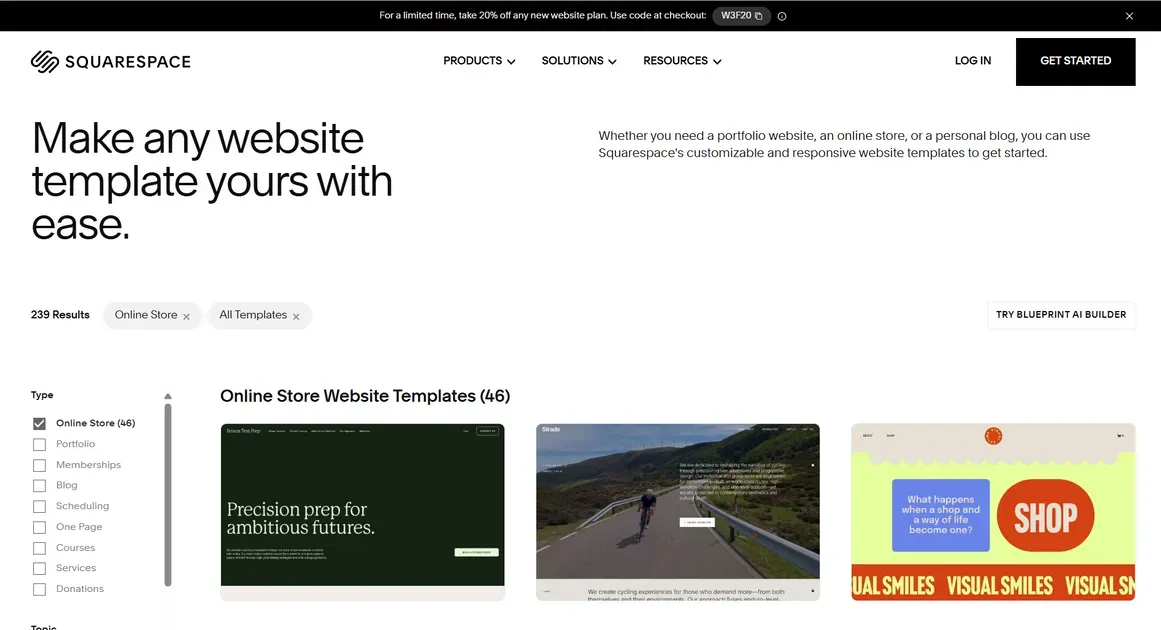
Squarespace is built for brands where visual presentation, typography, spacing, and imagery, is the top priority.
200+ Free Templates: Every template is included for free. They look professionally designed out of the box, making them perfect for photographers, designers, and boutiques.
Creative Freedom: Using Blueprint AI and the Fluid Engine, you can drag and drop elements with pixel-perfect precision. You can overlap images and create custom layouts without touching code.
One Downside: Major design shifts often require more effort. Unlike Shopify, changing your entire site structure on Squarespace can sometimes feel like starting over.
Shopify: The Management Powerhouse
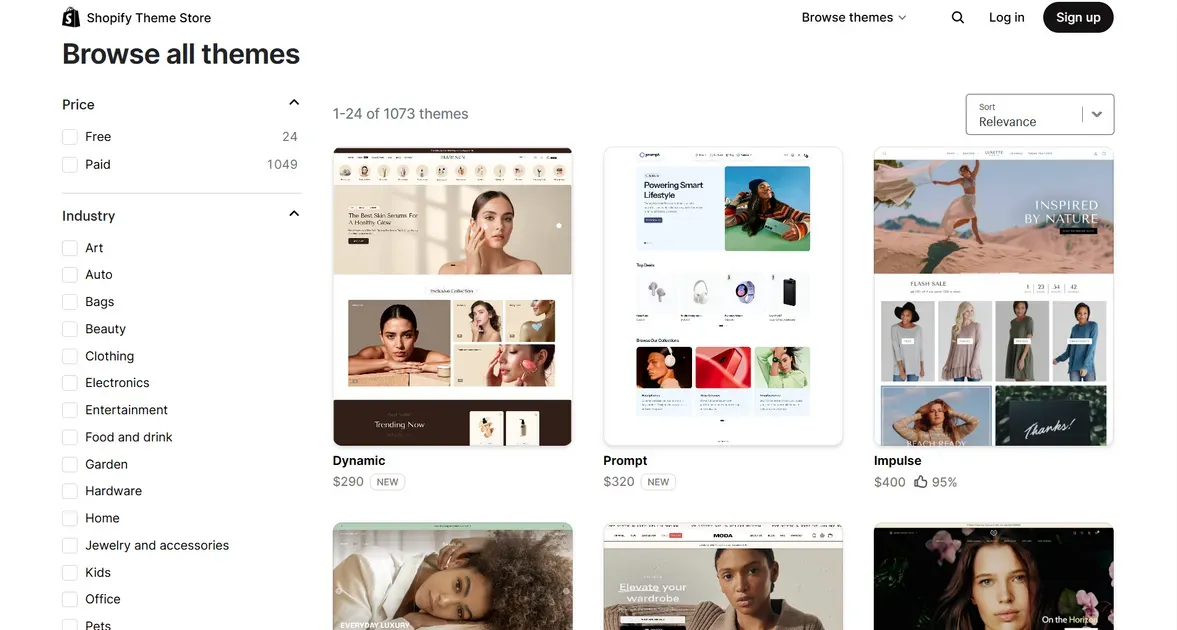
Shopify themes are engineered for performance and sales. While they are less "artistic" out of the box, they offer better backend management.
Theme Variety: You get 24 free themes and over 1,000 paid themes (typically $150–$450). For a unique look, you’ll likely need to pay.
Superior Theme Management: This is Shopify’s big win. You can build, customize, and preview a new theme in the background while your current site stays alive. You can swap your entire "look" with one click.
The Cost of Customization: To get a high-end look on Shopify, you often need to invest in a paid theme, custom Liquid code, or extra design apps.
The Verdict: Squarespace is best if you want a premium, artistic look for free. Shopify is better if you have the budget for a paid theme and want the ability to swap designs without rebuilding your content.
eCommerce Capacities
While both platforms help you sell, the gap between them in 2026 comes down to whether you are selling services and content or physical products at scale.
Squarespace: The "All-in-One" Business Tool
In 2026, Squarespace isn't just a store; it’s a business dashboard. It excels for creators, consultants, and boutique shops where the "brand" is as important as the "buy" button.
New for 2026:
AI Product Composer: You can upload a photo, and the AI writes the search-optimized title, description, and even the alt-text for you.
Tap to Pay: You can now accept contactless payments directly on your phone using the Squarespace app-no extra card reader hardware required.
Recurring Invoicing: Perfect for service-based businesses (like SEO or marketing), allowing you to automate monthly client billing directly through your site.
The Workflow: It’s intentionally simple. You can sell physical goods, digital downloads, and memberships (courses) from one screen.
The Limits: It’s best for small to mid-sized inventories. It caps at around 10,000 products and 250 variants per item, and it doesn't handle multiple warehouse locations well.
Shopify: The "Growth Machine"
Shopify is the world’s most powerful commerce engine. In 2026, it has moved beyond just being a website and into an "intelligent ecosystem."
New for 2026:
Agentic Storefronts: This is the big game-changer. Your products are now automatically discoverable and purchasable directly inside AI chats like ChatGPT and Microsoft Copilot. Customers can buy your products without ever visiting your actual website.
2,048 Variants: Shopify finally solved the "variant limit" headache. You can now have over 2,000 variations (size, color, material, etc.) per product, making it perfect for complex fashion or tech catalogs.
SimGym: An AI tool that simulates thousands of "customers" visiting your site to tell you exactly where they get confused or stop buying before you even launch a change.
The Workflow: It handles everything: international taxes, multi-currency, and shipping from 50 different warehouses simultaneously.
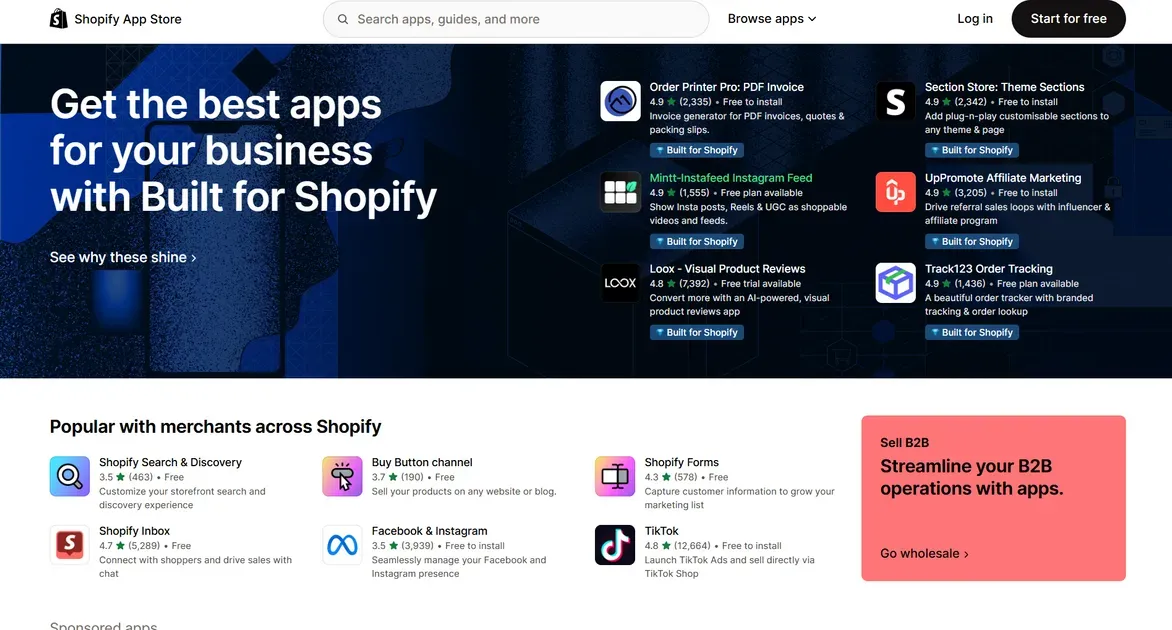
The Apps: If a feature isn't built in, there is an app for it. Shopify’s app store now has over 16,000 tools, though these usually add to your monthly bill.
The Verdict: Squarespace is the best choice if you sell services, digital content, or a curated selection of physical goods. It’s simpler and cheaper because most features are built-in. Shopify is the clear winner if you are scaling a physical product brand or want to sell globally across AI platforms and social media.
Ecosystem: Apps & Extensions
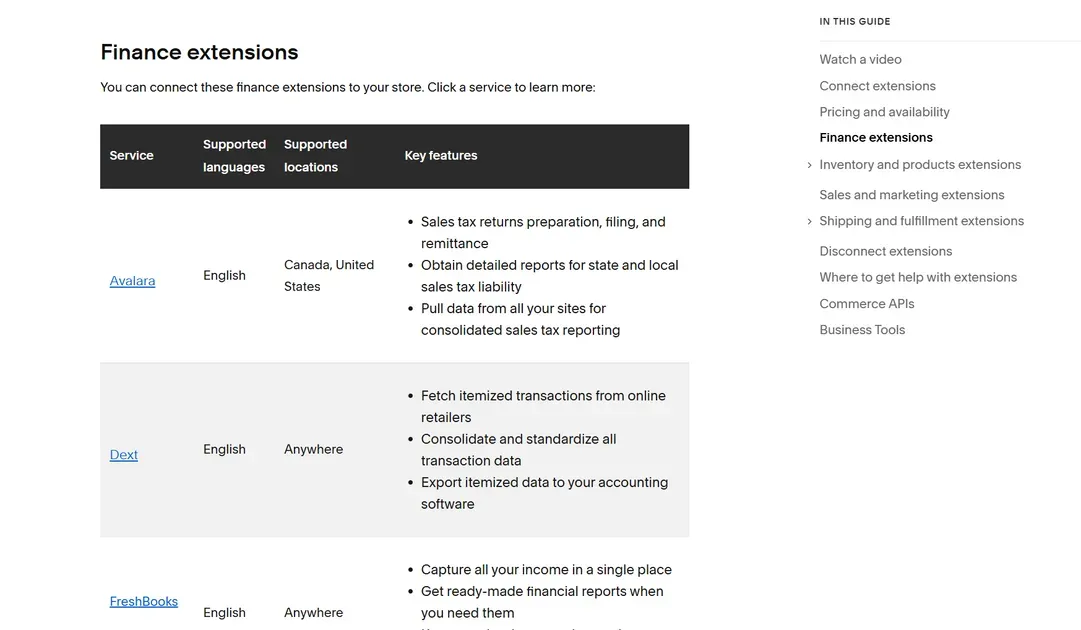
- Squarespace (Extensions): They focus on "Quality over Quantity." Instead of a giant marketplace, they offer a curated list of around 50 "Extensions" (like ShipStation for shipping or TaxJar for taxes). Because Squarespace vets every single one, they almost never break your site or slow it down. It’s for the owner who wants a "set it and forget it" system.
- Shopify (App Store): This is a limitless toolbox. As mentioned above, over 16,000 apps, Shopify can do things Squarespace can't even dream of, like advanced AI-driven upsells or complex wholesale portals. In 2026, many of these apps are now "AI-native," meaning they work in the background to optimize your store. The trade-off? You have to manage multiple subscriptions and potential site clutter.
The Verdict: Squarespace is for the minimalist who wants a clean, stable site. Shopify is for tinkerers who want to build a custom-coded powerhouse.
Payment Gateways & Flexibility
Squarespace
Squarespace focuses on keeping everything in one place with a clear fee structure.
Squarespace Payments: Their native solution. It’s "all-in-one," meaning payouts and taxes live in one dashboard. On higher plans (Plus/Advanced), you get Instant Payouts (get your cash in minutes).
The 0% Rule: If you are on a Commerce plan (Core, Plus, or Advanced), Squarespace charges 0% transaction fees. You only pay the standard credit card rate.
Third-Party Support: You can still use Stripe or PayPal, but you can't run them alongside Squarespace Payments; it’s one or the other. For in-person sales, you can connect to Square POS.
Shopify
Shopify is built for scale, but they strongly encourage you to use their own tools.
Shopify Payments: If you use this, you pay 0% extra transaction fees. As your business grows and you upgrade your plan, your credit card processing rates get significantly cheaper.
The "Third-Party" Tax: If you choose to use an external gateway (like a local bank), Shopify charges an extra 0.5% to 2% fee per sale just for the privilege of using their checkout.
International Power: Shopify supports 100+ gateways. If you need to accept local payments like MoMo or ZaloPay in Vietnam, Shopify is much more flexible than Squarespace.
The Verdict: Squarespace is the winner for simplicity and fixed costs. Shopify is the winner for international brands that need to support every local payment method on earth.
Dropshipping & Print-on-Demand (POD) Support
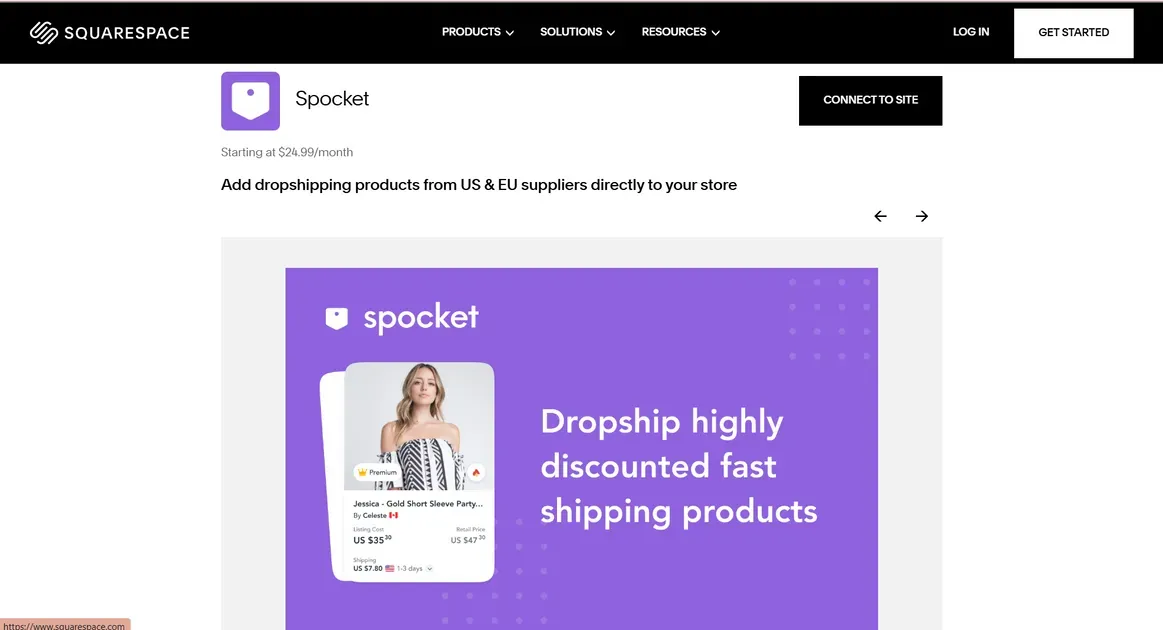
Squarespace is the ideal choice for a "boutique" approach where brand aesthetics come first. Rather than overwhelming you with options, it offers a curated selection of high-quality extensions like Printful, Printify, and Spocket. It is perfect for creators, artists, or influencers who want to sell a polished, limited collection of merchandise without the headache of managing a complex supply chain. If you want a store that looks like a high-end magazine and "just works," Squarespace is your best bet.
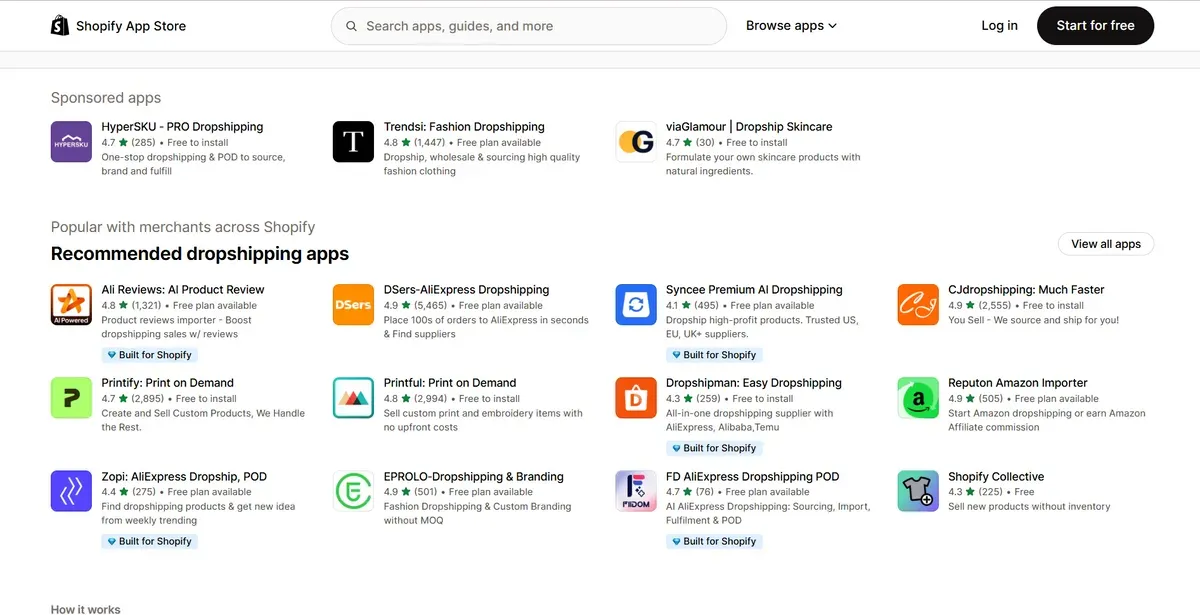
Shopify is a dedicated powerhouse built for high-volume dropshipping and scale. With a massive ecosystem of over 750 specialized apps (such as DSers, Zendrop and Doran for draft orders for POS), it allows you to automate everything from product sourcing to global fulfillment with one click. If your goal is to manage thousands of items, sync with multiple international suppliers, and use advanced automation to grow your business into a global brand, Shopify is the undisputed industry leader. Check for more POD apps for your Shopify store.
The Verdict: Squarespace is great for a curated "side-hustle" shop. Shopify is the winner for anyone building a serious, high-volume dropshipping business.
Omnichannel POS
Squarespace is built for businesses that are "online-first" but occasionally need to sell in person, like at a farmer's market, craft fair, or a one-day gallery event. Squarespace doesn't make its own hardware. Instead, it partners with Square. You connect a Square card reader to the Squarespace iOS app to sync your physical sales with your online inventory.
The Limits: It is only available on iOS and only in the United States. If you have a permanent retail store with multiple staff members and barcode scanners, Squarespace's POS will feel too basic.

Shopify is a "true" omnichannel platform. It treats your physical store and your website as one single entity.
First-Party Hardware: Shopify makes its own sleek hardware, like the Shopify POS Go (a handheld device with a built-in scanner and card reader).
Global Reach: Unlike Squarespace, Shopify POS works in dozens of countries and supports advanced retail features like "Buy Online, Pick Up In-Store" (BOPIS) and "Exchange in-person for online orders."
Inventory Intelligence: It tracks stock across multiple locations (warehouses, backrooms, and store shelves) simultaneously. If you sell your last t-shirt in your physical shop, it instantly marks it as "Sold Out" on your website to prevent overselling.
The Verdict: Shopify is the winner for permanent retail stores requiring dedicated hardware and multi-location syncing.
Customer Support
Squarespace offers a high-quality, "self-service first" support model that matches its polished aesthetic. You get 24/7 email assistance and live chat during specific business hours (Mon-Fri), though phone support is notably absent. Their strength lies in an award-winning Help Center filled with professional videos and guides, making it ideal for independent creators who prefer to fix things themselves with clear, visual instructions.
Shopify provides a more robust, "business-never-sleeps" support system with true 24/7 access via live chat, email, and phone. Unlike Squarespace, they offer support in over 20 languages and provide more technical, growth-oriented advice. It is the superior choice for high-volume merchants who need an immediate human response at any hour to ensure their storefront never goes offline.

Marketing & SEO
SEO (Search Engine Optimization)
Squarespace: This is the king of Content-Driven SEO. Its blogging engine is far superior, offering cleaner URL structures and a more intuitive interface for long-form content. Squarespace provides an AI SEO Visibility Tool that gives real-time suggestions as you build. However, technical tasks like creating 301 redirects (essential when changing page links) must be done manually, which can be time-consuming for large stores.
Shopify: This is a Technical SEO Powerhouse. It is built for speed, consistently outperforming Squarespace in mobile load times—a major Google ranking factor. Shopify automates the "boring" stuff: it creates canonical tags to prevent duplicate content and automatically generates 301 redirects the moment you change a product URL. For stores with hundreds of items, this automation is a lifesaver. You can check some of the best SEO apps to boost your optimization efforts.

Social Media & Multi-Channel Selling
Squarespace: You can sync your products to Instagram and Facebook and push content to platforms like LinkedIn, Pinterest, and X (Twitter). It’s perfect for creators who use social media to build a brand image.
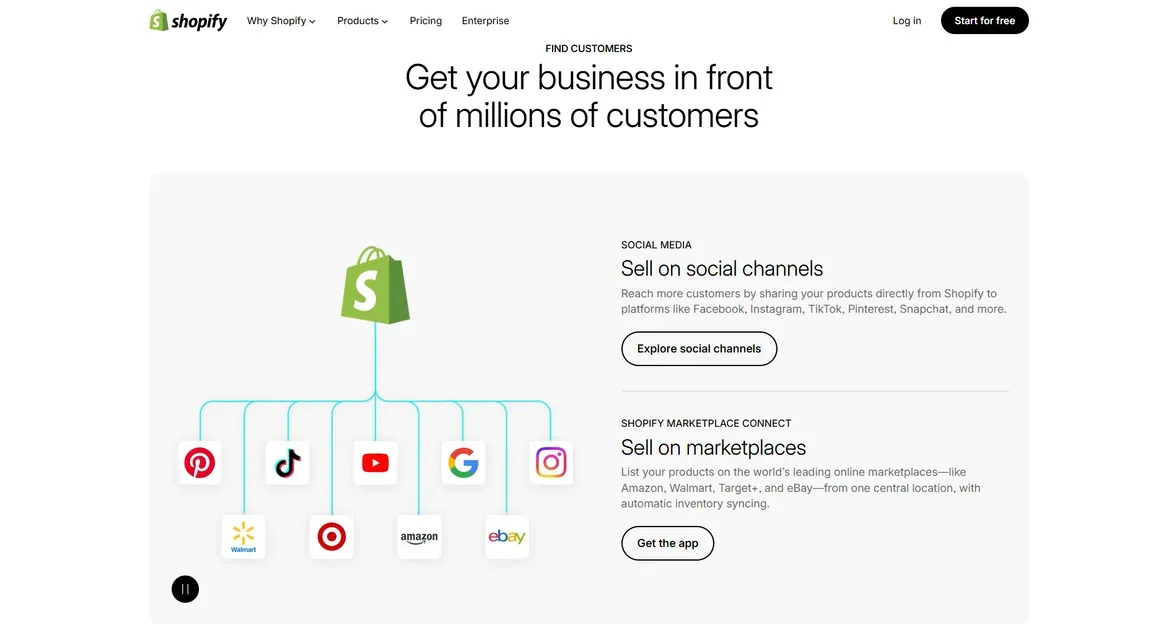
Shopify: Shopify integrates with over 10 platforms, including Amazon, eBay, TikTok, and even YouTube Shopping. You can tag products directly in videos or sync your entire inventory with Amazon in real-time. If you want to be everywhere your customers are, Shopify is the only choice.
Email Campaigns & Automation
Squarespace: Squarespace’s Email Campaigns tool is a native extension of your site, ensuring every newsletter automatically inherits your brand’s fonts, colors, and premium aesthetic. You can pull blog posts or products directly into your emails. While convenient, it’s an add-on cost (starting at $5–$7/month), and its automation flows are relatively basic.
Shopify: Includes Shopify Email for free (up to 10,000 emails/month). While the templates are more "commercial" than "artistic," the platform excels in Marketing Automation. You can build complex "flows"—for example, sending a specific discount to a customer who has spent over $500 but hasn't visited in 30 days.
Analytics & Abandoned Cart Recovery
Squarespace: Provides clean, visual reports on traffic and sales. However, the powerful Abandoned Cart Recovery feature (which emails people who left items in their cart) is only available on the Advanced Commerce plan ($72+/month).
Shopify: Offers much deeper data, with over 14 different report types (finance, behavior, acquisition). Crucially, Abandoned Cart Recovery is included on all plans, even the $25/month Basic tier. This feature alone often pays for the subscription by "rescuing" lost sales.
The Verdict: Squarespace is best for brands growing through blogging, aesthetics, and organic storytelling. Shopify is the winner for aggressive, data-driven sellers who need advanced automation, technical SEO, and multi-channel dominance to scale.
Squarespace vs Shopify: How to Choose the Right Platform for Your Business?
Choose Squarespace if you are a creator, photographer, or service-based professional who prioritizes a high-end, magazine-style aesthetic. It is the best choice for those building a brand through storytelling, blogging, or portfolios and who prefer a predictable, "all-in-one" price tag. If you manage a curated catalog of under 100 products and want a beautiful website that is easy to maintain without juggling dozens of extra apps, Squarespace is your perfect match.
Choose Shopify if your primary goal is aggressive e-commerce growth and high-volume sales. It is the mandatory choice for businesses with large, complex inventories or those who need to sync products seamlessly across global channels like Amazon, TikTok, and physical retail stores. If you are a data-driven merchant who requires advanced automation—such as flexible abandoned cart recovery and 24/7 technical support—Shopify provides the professional infrastructure needed to scale a global empire.
| Feature / Need | Squarespace | Shopify |
|---|---|---|
| Stunning, "out-of-the-box" design? | YES | No (Serviceable) |
| Best-in-class blogging & SEO? | YES | No (Basic) |
| Unlimited product variants & scale? | No | YES |
| Sell on Amazon, eBay, & TikTok? | No | YES |
| 24/7 Phone & Live Chat support? | No | YES |
| Built-in Email & Marketing? | YES | Limited (Apps needed) |
| Best for Dropshipping & POD? | No | YES |
| Low-cost "all-in-one" pricing? | YES | No (App costs add up) |
FAQ
Should I use Squarespace and Shopify at the same time?
Using Squarespace and Shopify together (via the Shopify Buy Button on a Squarespace site) is generally unnecessary and creates "divided attention". While it offers the best of Squarespace's design with Shopify’s e-commerce strength, it is often better to use only one platform. Use Shopify for high-volume sales/large inventory, or Squarespace for design-focused, small-scale, or service-based businesses
What is the cost to switch platforms in 2026?
The cost of migrating Squarespace vs Shopify or vice versa typically ranges from $100 to $1,000+ for a mid-sized store.
Migration Tools: Apps like LitExtension cost $50–$200 to move products and SEO data.
Design: Premium themes on Shopify vs Squarespace range from $150 to $350 if you move away from free templates.
SEO: You may need a one-time audit (starting at $300) to set up 301 redirects and ensure you don't lose your Google rankings during the move.
Final Thought
When deciding between Squarespace vs Shopify, remember that your website is more than just a digital storefront-it. It is the engine of your business. The choice depends on where you want to spend your energy.

Hey! I'm Linda Bui. Join me as we explore tips and tutorials about Shopify apps and Shopify themes for your Shopify store.
Start Building Trust Today
Install the Product Reviews app to improve your store's credibility and boost sales with real customer reviews.
Get Started with Zero CostWhat to not miss out on our blog
Gain insightful knowledge and invaluable experiences from dedicated experts.
_1200x630.webp)
What Is Shopify Collabs? How It Works and How Brands Use It in 2026
Discover what is Shopify Collabs, how it automates affiliate tracking, and how to use it to scale influencer marketing from your dashboard. Read right now!
_1200x630.webp)
_1200x630.webp)
Newsletter
Get all the stories you need-to-know from the most powerful name in news delivered first thing every morning to your inbox